AI video tools have made the production part fast. A whiteboard maker like Skribbly turns a topic into a finished video in minutes. What they don’t do is pick the topic for you or research it. You still sit in front of an empty topic box, wondering what people actually search for and which facts to give the AI so it doesn’t make things up.
That’s the gap I built Topic Scout for. It’s a Chrome extension that comes with my Skribbly bonus, and it takes you from “what should my next video be about?” to a researched script in five steps. Here’s the workflow, shown in the video:
Key Takeaways
- Good YouTube topic research starts with what people type into YouTube’s search bar, not with what you’d like to talk about.
- YouTube’s autocomplete suggestions show real search phrases. They don’t show how many people search, so treat them as demand signals, not volumes.
- Topic Scout pulls those suggestions by language and country, turns them into ten video ideas, builds a fact sheet from your source page and writes paste-ready scripts.
- Every fact is tied to the line it came from. Anything the page doesn’t say shows up as a [CHECK] blank instead of a guess.
- The keyword part works without an AI key. Topics, fact sheets and scripts run on your own OpenAI, Claude or Gemini key.
Why YouTube Topic Research Matters More With AI Video Tools
When a video takes a day to make, you think hard about the topic. When it takes ten minutes, it’s tempting to make whatever comes to mind. That’s how channels fill up with videos nobody searches for.
The fix is simple: start from the phrases real viewers type. A title like “what is an air fryer and how does it work” matches a search people already make. A title like “My thoughts on kitchen gadgets” doesn’t. The second problem is facts. AI writers fill gaps with plausible-sounding details, so you want a short list of verified facts before the script is written.
How to Find YouTube Video Topics in 5 Steps
1. Start from a page (or a niche)
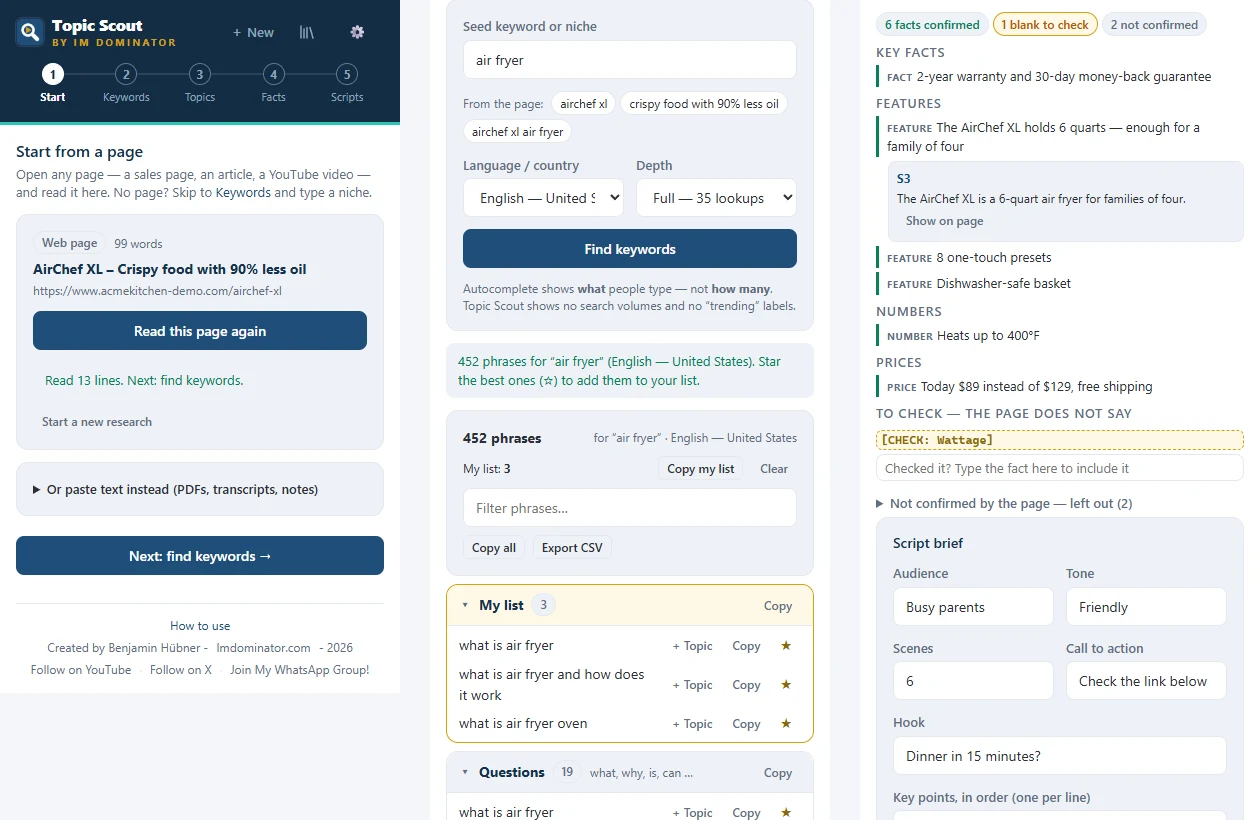
Open any page you want to make a video about: a product’s sales page, an article, a YouTube video. Topic Scout opens in Chrome’s side panel and reads it when you click “Read this page”. PDFs, transcripts or your own notes can be pasted in instead. No page at all? Skip straight to keywords and type a niche.
2. Pull the YouTube keywords
Enter a seed keyword (Topic Scout suggests some from the page) and pick the language and country. It then collects YouTube’s own search suggestions, the way real searchers type: the keyword alone, with letters added, with question words like “what is” and “how to”, comparisons and “best” lists. A full run makes about 35 lookups, a quick run about 9.
The results come back de-duplicated and grouped into questions, comparisons, lists, how-to and beginner phrases. You star the ones you like into your list, copy them or export a CSV. In my air fryer test, one full run returned 452 phrases.
One honest note the extension makes itself: autocomplete shows what people type, not how many. Topic Scout shows no search volumes and no “trending” labels it can’t back up.
3. Get ten video ideas
One click turns the page and your chosen keywords into ten video topics. Each comes with a working title (search phrase first), the video type it suits best (explainer, X vs Y, top list, how-to or story) and a one-line angle. Tick the ones you want to make.
4. Build a fact sheet you can trust
For the topic you pick, Topic Scout builds a fact sheet from the page only: key facts, features, numbers and prices, each tied to the sentence it came from, with a “show on page” link. What the page doesn’t state appears as a visible [CHECK] blank, and facts it couldn’t confirm are left out.
Below the facts sits a script brief: audience, tone, number of scenes, call to action, hook and the key points in order. From there you can copy a “Facts to use” block, copy the brief, copy a ready prompt for ChatGPT or Claude, export everything, or save it to your topic library.
5. Write the scripts
The optional last step writes voice-over scripts for the topics you ticked: scene by scene, hook first, with facts only from that topic’s fact sheet. Each script gets five hook options and goes through a check for scene count, hook, word count, facts and hype words before you see it. The output pastes straight into Skribbly’s “Use my own script” box, and works in any other video tool too. If you’d rather write the script yourself, my whiteboard explainer script template walks through the structure.
Keep a Content Plan Without a Spreadsheet
Every topic you keep lands in the topic library, saved in your browser with its keywords and fact sheet. You set the status as you go (idea, made, published) and can export the whole library as a CSV. Over a few weeks that list becomes your channel’s content plan.
What It Costs to Run
The keyword research is free: no AI key needed. Topics, fact sheets and scripts use your own OpenAI, Anthropic or Google Gemini key, and Topic Scout shows the cost after each run. Your key stays in your browser and is only sent to the AI provider you choose.
How to Get Topic Scout
Topic Scout isn’t sold on its own. It’s the lead bonus in my Skribbly bonus stack: buy Skribbly ($17 one-time) through my link, and your receipt takes you to my bonus page with a code that unlocks it, along with my Video Topic Goldmine skill, the Video-to-Post Repurposer and the rest of the stack.
New to Skribbly? My full Skribbly review shows how the whiteboard videos are made and what each one costs.
Get Skribbly → | See the full bonus stack and how to claim it →
Frequently Asked Questions
How do I find YouTube video topics people search for?
Start from YouTube’s autocomplete suggestions: type a seed keyword into YouTube search and look at what it suggests, or use a tool that collects them for you in bulk. Questions (“what is”, “how to”), comparisons (“vs”) and “best” lists are usually the strongest video topics.
Does YouTube autocomplete show search volume?
No. Autocomplete shows phrases people type, not how many people type them. That’s why Topic Scout doesn’t show search volumes or “trending” labels.
Do I need an AI key to use Topic Scout?
Not for keyword research. For topic ideas, fact sheets and scripts you connect your own OpenAI, Claude or Gemini key, and the cost per run is shown in the extension.
Does Topic Scout only work with Skribbly?
No. The fact sheets, briefs and scripts work with any AI video tool or with ChatGPT and Claude. The script format is simply ready to paste into Skribbly’s own-script mode.
Disclosure: Topic Scout is my own extension, included as a bonus with Skribbly purchases made through my affiliate link. If you buy through that link I earn a commission at no extra cost to you.