
Most “best AI agent” lists are written by people comparing feature pages. This isn’t one of those. It’s what I actually run, what my agents do every day, what went wrong (including a compromised server), and the rules I follow now.
If you’re deciding between a hosted agent like Claude or Codex and a self-hosted one like OpenClaw or Hermes, this should save you a few expensive lessons.
Key Takeaways
- I run Claude and Codex as my main agents, and OpenClaw and Hermes as self-hosted agents on separate hardware.
- Research and Pinterest campaigns run on their own. Anything that publishes or sells, like product creation, sales pages and content updates, I still trigger myself.
- An OpenClaw instance on a VPS was compromised because I forgot to switch the firewall back on. It was a test environment, but it changed how I set everything up.
- Beginners should start with Claude or Codex. Self-hosted agents are more powerful, but only worth it once you can lock them down properly.
What I Run
| Tool | Role in my setup |
|---|---|
| Claude | Main agent, and currently the only one that handles anything sensitive |
| Codex | Runs alongside Claude |
| OpenClaw | Self-hosted agent on its own hardware |
| Hermes | Self-hosted agent on its own hardware |
| Activepieces | Where I started with automation |
| Make | Used it for a long time; dropped it once OpenClaw and Hermes took over those automations |
You could also count my “second brain”, a knowledge base that collects, sorts and reviews my notes and research on its own every day. It isn’t a single agent, but it behaves like one.
What the Agents Actually Do
Jobs that run on their own
- Pinterest campaigns through my own Pinterest agent, PinAgent.
- Information gathering and research that feeds my content and product ideas.
Jobs I trigger (semi-automatic)
- Updating content on my content sites
- Product creation
- Sales pages
- Tutorials and reviews
There’s a pattern there. Anything that gets published or sells something still starts with me. The agents do the volume; I make the call on what goes out.
What Went Wrong
Quality at the start
In many cases the first outputs simply weren’t good enough. That’s normal. Plan for a period of tuning prompts, instructions and examples before you trust a workflow.
Instructions fade over time
An agent follows your rules perfectly in week one. A few weeks later the output starts to drift. You can’t set rules once and walk away; you have to check the work regularly.
High standards mean a lot of correcting
Product creation works well for me. But I have high standards, so I still edit a lot. That’s the right split: the agent produces, you judge.
The hack
An OpenClaw instance on a VPS was compromised. The cause wasn’t exotic: I had disabled the firewall and forgot to turn it back on. Fortunately, it was only a test environment with nothing sensitive on it.
That single mistake shaped every rule below.
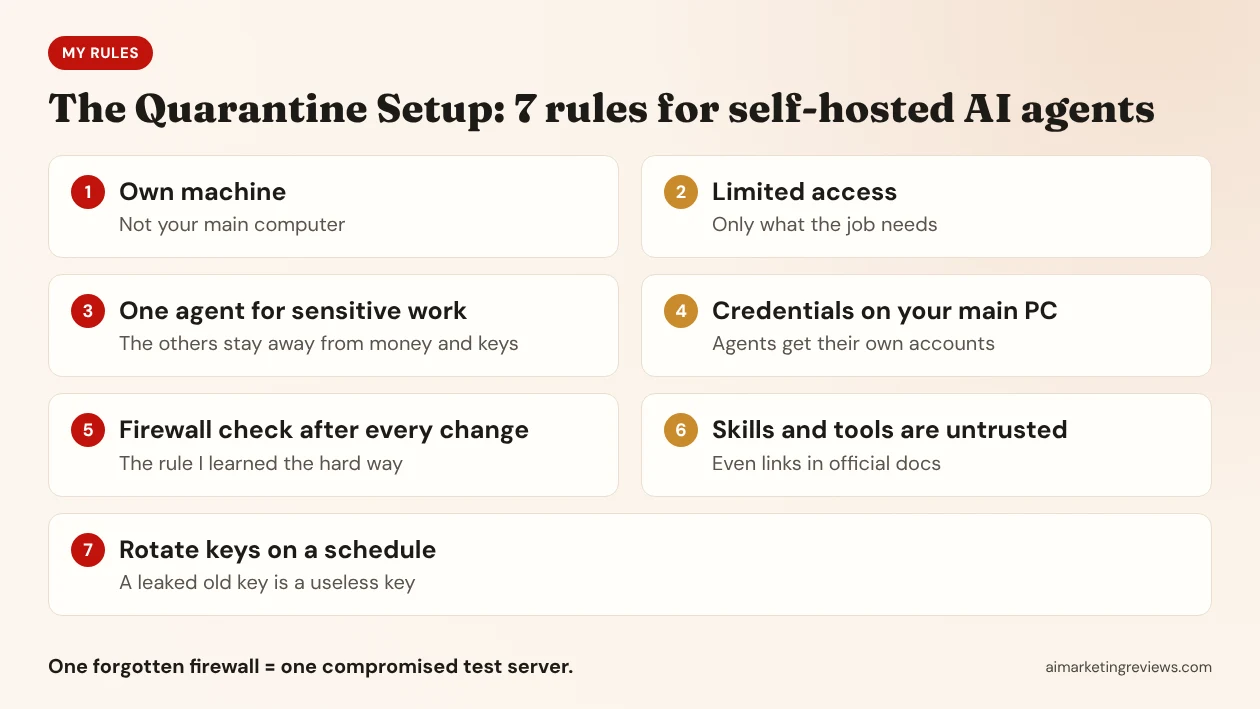
My 7 Rules for Running AI Agents Safely
1. Agents get their own machine
Not your main computer. My agents run on a separate mini PC and my NAS. If one is compromised, the damage stays on that box.
2. Limited access to infrastructure
Each agent gets access to what its job needs and nothing else. A research agent doesn’t need your hosting panel.
3. One trusted agent for sensitive work
Right now only Claude handles anything sensitive in my setup. The other agents don’t touch payments, customer data or production keys.
4. Credentials stay on your main PC
My credentials live on my main PC only. The agents mostly have their own accounts. If an agent account is compromised, you lose that account, not your business.
5. Check the firewall after every change
Every time you open a port or disable something for testing, put it back and check it. This is the rule I learned the hard way.
6. Treat skills and installable tools as untrusted, even from official docs
The agent ecosystem has a supply-chain problem. Researchers at the Cloud Security Alliance documented more than a thousand malicious skills on ClawHub earlier this year. In October, OX Security scanned 15,465 public MCP servers and found no review process, and six servers sitting on expired domains that anyone could register, as reported by The Hacker News.
The same risk shows up in documentation. Official docs sometimes contain dead links. If the domain behind a dead link expires, someone else can register it and serve whatever they like to everyone who follows the docs. Read what you install, and check where every link actually goes.
7. Rotate keys regularly
Assume a key will leak eventually. If you rotate on a schedule, it’s already useless by the time it does.
Want the full checklist?
These seven rules cover the agent side. The rest of my security process is in The AI Hack Defense Playbook, a one-weekend playbook for online business owners: revoking old app permissions, hardening WordPress, auditing what your AI tools can access, and protecting your email and identity.
What It Costs
Very little, because most of it runs on hardware I already own: a NAS, a Minisforum mini PC and a graphics card. I use a VPS only for testing and production right now, and I’m considering adding cloud capacity later. If you don’t have home hardware, the hosted tools are the cheaper way in.
Which Agent Should You Start With?
Option A: Claude or Codex
Use this when you’re starting out, want results this week and don’t want to run a server. Tools like Kimi Work fall into the same group; I haven’t tested all of them, so I won’t rank them.
Option B: OpenClaw or Hermes
Use this when you have a separate machine, know how to lock down a firewall and network, and want an agent running around the clock on your own hardware. They’re more powerful, and more demanding if you want the benefits without the risk.
My advice: start with Option A. Move to Option B when your setup is ready for it, not when the hype says so. If you start with Claude Code, check the settings in my breakdown of the October 2026 Claude Code update before you let it run on its own.
I share setups like this and review members’ agent configurations in AI Agent Profit Lab, my community for people building with AI agents and automation.
FAQ
Is it safe to run OpenClaw or Hermes at home?
It can be, if the agent runs on its own machine, has limited network and infrastructure access, uses its own accounts rather than yours, and sits behind a firewall you check after every change.
Which AI agent is best for beginners?
Hosted agents like Claude or Codex. You get useful results without running or securing a server yourself.
Should I install community skills and MCP servers?
Only after reading what they do and checking where they come from. There’s no central review process for most public skills and MCP servers, so treat every one as untrusted until you’ve checked it.
Disclosure: PinAgent and The AI Hack Defense Playbook are my own products. This post describes my personal setup as of October 2026. Security research figures are from the Cloud Security Alliance and OX Security as reported in 2026.