Disclosure: Klap gave me Pro access to test it, and the Klap links in this guide are affiliate links. If you buy through them, I may earn a commission at no extra cost to you. The YouTube steps come from YouTube’s own help pages, the Klap numbers from my own test.
How to make clips from YouTube videos? You have four ways: the Clip button, YouTube’s own “Edit into a Short”, a manual editor, and an AI clipper. The first two are free and live inside YouTube. The last two give you video files you can post anywhere.
Which one you need depends on what you mean by “clip”. A YouTube Clip is a shareable link to 5 to 60 seconds of a video. A clip you post on TikTok, Reels or Shorts is a new video file. Most guides mix the two up.
Below you get all four methods step by step, a table to pick yours in a minute, what YouTube allows in 2026, and the real numbers from my own run: one 6:19 video in, 6 captioned shorts out, about 6 minutes of waiting.
Which Way to Clip a YouTube Video Fits You?
| Method | What you get | Works on | Cost |
|---|---|---|---|
| 1. Clip button | A link to a 5 to 60 second segment that plays on YouTube | Any video whose creator allows clips | Free |
| 2. Edit into a Short | A Short of up to 60 seconds on your channel, linked to the long video | Your own public videos | Free |
| 3. Manual editor | Video files you cut, crop and caption yourself | Videos you hold the file and the rights for | Free tiers exist, paid plans vary |
| 4. AI clipper | Several vertical clips with captions, picked and ranked for you | Videos with speech that you hold the rights for | One free test video, then from $14.50 a month |
Quick rule: sharing one moment with a friend is method 1. One Short from your own video is method 2. A handful of clips with full control is method 3. A steady flow of clips from every long video is method 4.
Method 1: How to Clip a YouTube Video With the Clip Button
The Clip button creates a public link to a short segment of a video. The segment stays on YouTube and plays on top of the original video. There is no file to download.
Step 1: Open the video while signed in. On desktop, click More below the video, then Clip. In the Android app, swipe the row of buttons below the video and tap Clip.
Step 2: Name your clip. The title holds up to 140 characters.
Step 3: Drag the slider to the moment you want. A clip runs between 5 and 60 seconds.
Step 4: Click Share clip. Copy the link, embed it, or send it to a social network or by email.
Good to know:
- Creators can switch clipping off for their channel. Then the Clip button is missing.
- A clip stops working when the original video is deleted, set to private or removed for a guideline violation.
- Clips of live streams need DVR to be on.
Source: YouTube Help, “Create and share a clip”, read on November 13, 2026.
Method 2: How to Make a Short From Your Own YouTube Video
YouTube has its own tool for turning a long video into a Short. It works on public videos you uploaded yourself.
In the YouTube app (Edit into a Short):
Step 1: Open the watch page of your own video and tap Remix, then Edit into a Short.
Step 2: Select up to 60 seconds. Pick a layout and add text or filters.
Step 3: Tap Next and publish. If you picked less than 60 seconds, you can record more with the Shorts camera.
In YouTube Studio (Clips and Shorts):
Step 1: Go to Content, open the video and choose Clips and Shorts in the left menu.
Step 2: Pick the segment from the transcript, by timestamp, or from YouTube’s AI suggestions. The suggestions are available in a list of countries that includes the US, the UK, Canada and Germany.
Step 3: Adjust, preview with auto captions, create the draft and finish the upload dialog.
Why this method is underrated: YouTube adds the long video as a related video to the Short. Every viewer of the Short gets a direct path to the full video.
The limits: one Short at a time, 60 seconds through Edit into a Short, and the result lives on YouTube. For TikTok and Reels you still need a file.
Sources: YouTube Help, “Create YouTube Shorts from your videos” and “Video Clips & Shorts in YouTube Studio”, read on November 13, 2026.
Method 3: Cut Clips by Hand in an Editor
A manual editor gives you full control over every cut. You need the video file, so this fits your own recordings.
Step 1: Find the moments. Open the transcript of your video and mark every passage that works alone: one claim, one tip, one story with a payoff.
Step 2: Cut and reframe. Set the project to 9:16, trim to the passage and move the crop so the speaker or the screen stays in frame.
Step 3: Add captions and a title line. Most shorts are watched muted first.
Step 4: Export at 1080 x 1920. YouTube counts vertical and square videos of up to three minutes as Shorts.
CapCut also has a web tool called “Long Video to Short Clips”: you upload a video, choose the clip length, and it cuts several clips and adds captions. CapCut’s page describes the online editor as free and tells you to check what your account includes. I read that page on November 13, 2026 and have not run the tool on my test video.
Time check: finding the moments is the slow part. That search is exactly what an AI clipper takes over.
Method 4: How to Make Clips From YouTube Videos With an AI Clipper
An AI clipper reads the whole video, picks the strongest moments, crops them to vertical and adds captions. I use Klap, which I reviewed here, so the steps and numbers below come from my own account.
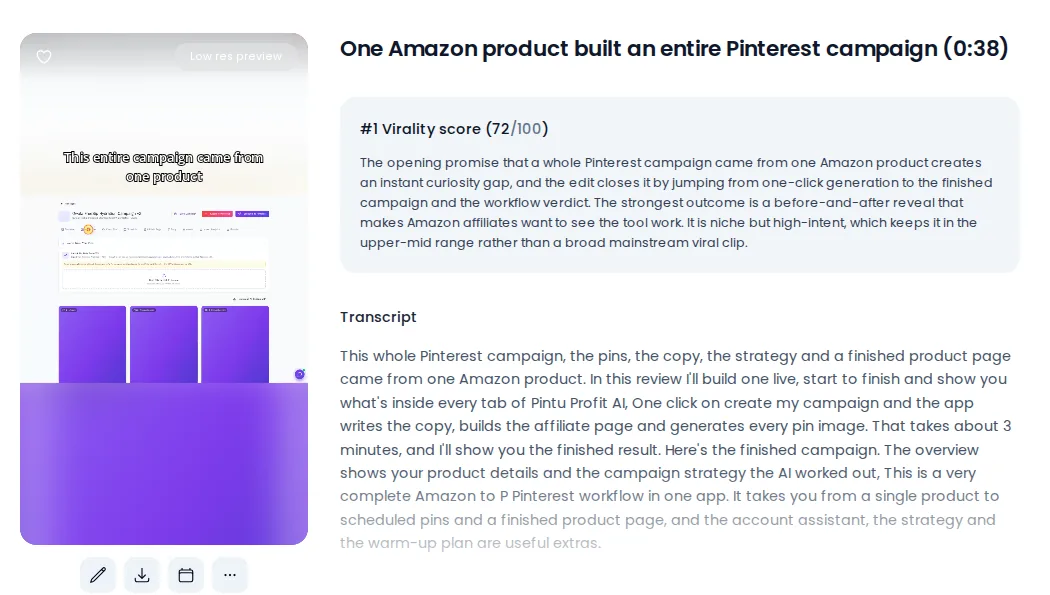
My run: a 6:19 review video from my channel. Klap predicted about 7 shorts, took about 6 minutes and delivered 6 shorts, each with a title, captions, a score from 0 to 100, a written reason and the transcript.
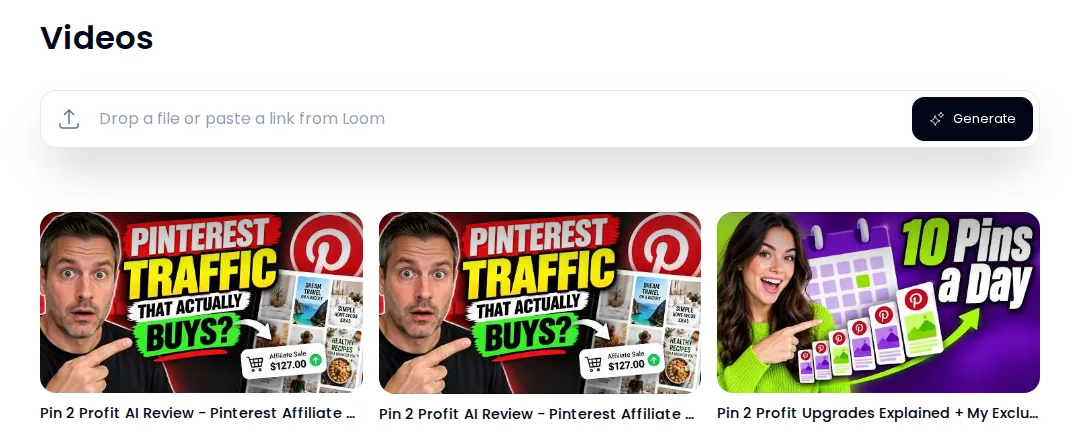
Step 1: Paste the link or drop the file. The field sits at the top of the dashboard. My test used a YouTube link.
Step 2: Tell the AI what a good moment is. Klap always looks for the strongest moments. In the Moments box you add your own instruction in plain words.
The prompt I used (copy/paste and adapt):
“Moments where I show which Pinterest pins lead to real sales.”
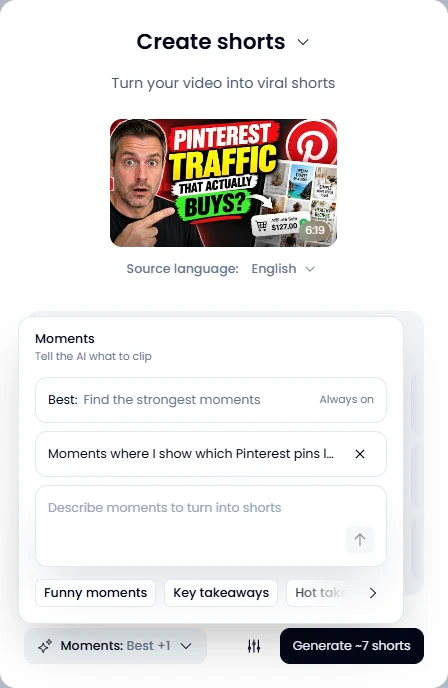
Step 3: Generate and close the tab. Klap sends an email when the shorts are ready. Mine took about 6 minutes.
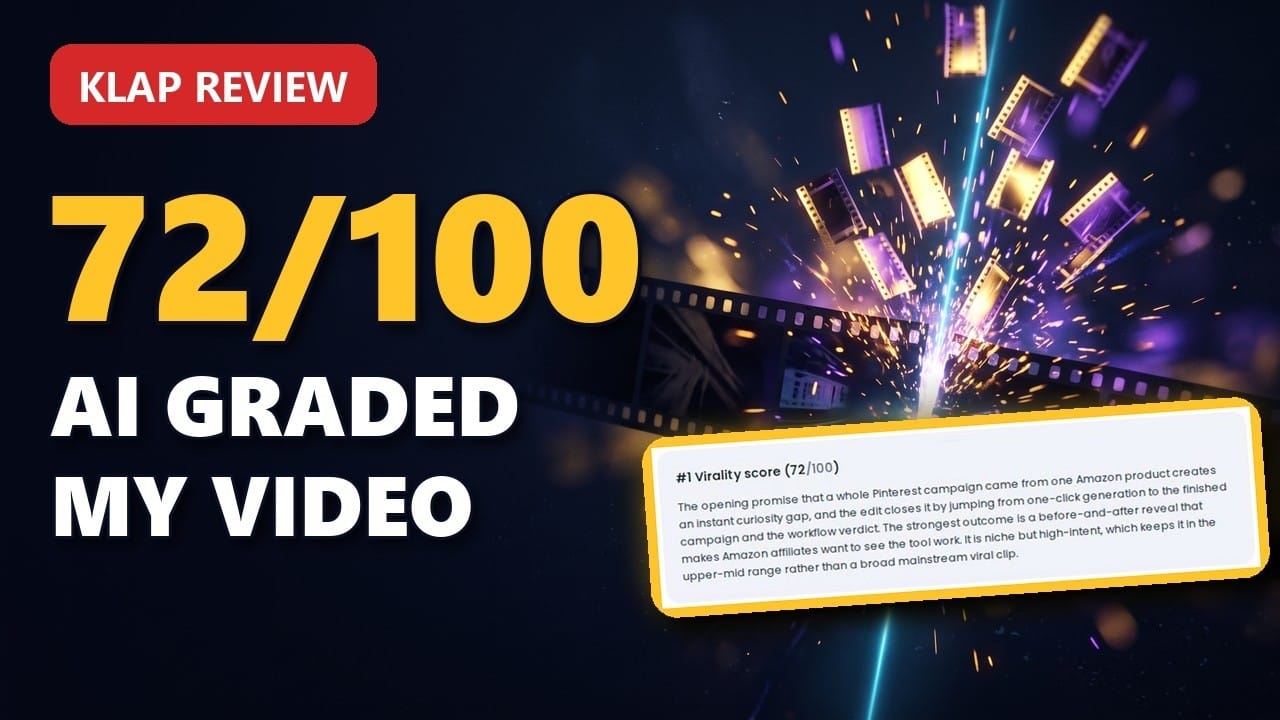
Step 4: Read the reasons, then pick. Every short comes with a score and a paragraph that explains the pick and names what holds the clip back.
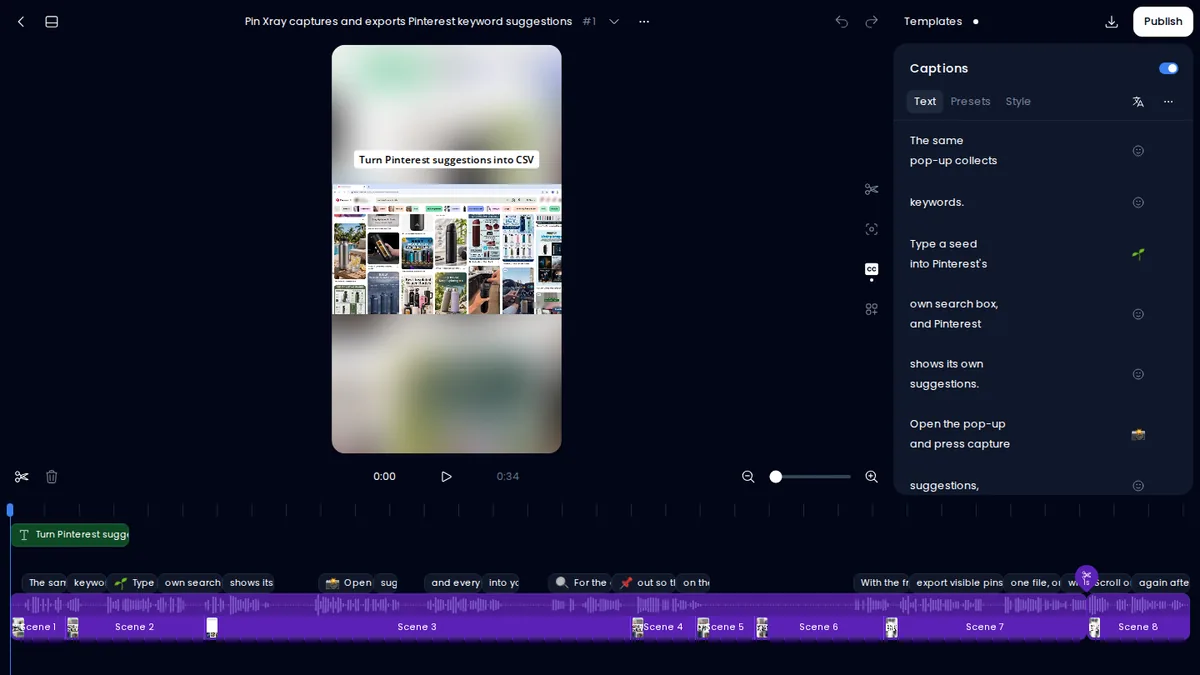
Step 5: Edit, then download or schedule. You trim by deleting words from the transcript, change the caption style, add a logo or an intro title, and download the file or put it on the posting calendar.
What it costs: you can run one video for free with no credit card and see the result. Downloading and posting clips needs a paid plan: Basic gives you 100 clips a month for $29, or $14.50 a month billed yearly. Each short counts as one clip, and the length of your source video does not count. Prices checked November 2026 on klap.app/pricing.
Run One Video Through Klap for Free
Klap is one of several clippers. If you are comparing, my Opus Clip alternatives comparison puts six of them side by side on price and free plan.
5 Moments Prompts to Adapt
The first one is the prompt from my test. The other four follow the same pattern for other video types.
- Product review: “Moments where I show which Pinterest pins lead to real sales.”
- Tutorial: “Moments where I finish one step and the result is visible on screen.”
- Podcast or interview: “Moments where the guest states a strong opinion and gives the reason in the same answer.”
- Webinar: “Moments where I answer a question from the audience in under 40 seconds.”
- Talking head: “Moments that start with a number or a surprising claim and end with the takeaway.”
Is It Legal to Use Clips From YouTube Videos?
Clipping your own videos is yours to do. For other people’s videos, the answer depends on the method and on the rights holder. Here is what YouTube and the US Copyright Office state. This is a summary of their pages and no legal advice.
- The Clip button and Remix are YouTube’s own features. Creators can switch both off, and a remix or clip disappears when the original is removed.
- Downloading and re-uploading someone else’s video is a different thing. YouTube’s fair use page says fair use is decided case by case. Giving credit or adding a disclaimer does not make a use fair by itself.
- Content ID applies to Shorts. A Short of over one minute with an active copyright claim is blocked, according to YouTube’s help page on Shorts.
- The US Copyright Office names four factors and says there is no formula for how much of a work you may use.
What Changed in October 2026
On October 1, 2026 YouTube published a post titled “Prioritizing original content on Shorts” in its help community. Social Media Today reported the same day that YouTube will prioritize original content and reduce the reach of Shorts re-uploaded from other creators. Channels that mainly collect and re-upload other people’s videos will likely see less distribution in the Shorts feed. The reports name no start date.
For monetization, YouTube’s reused content policy already asks for a meaningful difference between the original video and yours.
What I take from it:
- Clip your own long videos. That is the safe ground and the best use of the tools above.
- If you clip for someone else, get their permission in writing.
- Add your own layer to every clip: your hook, your comment, your result.
If your channel already struggles with reach, my article on the trust signals YouTube looks for covers the wider picture.
Mistakes to Avoid When You Clip a YouTube Video
- Clips that start mid-thought. A clip needs its own first sentence. Trim until the first words make sense alone.
- No captions. Add them every time.
- Posting everything the AI suggests. Read the reasons and post the top two or three.
- Trusting the score as a forecast. My top clip scored 74 on one run and 72 on the next. Use the score to sort.
- Forgetting the path back. Link the long video in the description or as the related video.
Once the clips exist, posting them is the next time sink. My guide to free YouTube Shorts upload automation covers that part, and the Shorts audit prompt pack helps when a clip gets no views.
Klap picks the moments. My bonuses help you tell it what to pick and turn the views into buyers: the Moments Prompt Library, the Hook & Script Engine and seven more, with any paid plan through my link.
YouTube Clip FAQ
How do I clip a YouTube video and save it?
The Clip button saves a link, and the clip stays on YouTube. To save a file, cut your own video in an editor or run it through an AI clipper and download the result.
How can I convert a long video into a short video online for free?
For your own YouTube videos, “Edit into a Short” in the YouTube app is free. Several AI clippers offer a free test. Klap lets you run one video for free, and downloading the clips needs a paid plan.
How do I make a Short from a YouTube video?
Open your own video in the YouTube app, tap Remix, then Edit into a Short, and select up to 60 seconds. In YouTube Studio the same job sits under Clips and Shorts.
How long can a YouTube clip be?
A clip made with the Clip button runs 5 to 60 seconds. A Short can run up to three minutes.
How do I clip a YouTube video without the Clip button?
A missing Clip button means the creator switched clipping off. For your own video, use Edit into a Short or cut the original file in an editor or an AI clipper.
What is the best YouTube clip maker?
For one Short from your own video, YouTube’s own tool. For many clips from long videos with speech, an AI clipper. I use Klap because every clip comes with a score and a written reason.
Your Next Step
Pick one long video you already published. Make one Short with YouTube’s own tool today. Then run the same video through an AI clipper and compare which moments it picks.
Try Klap on Your Own Video (Free Test)
Want more practical AI workflows like this? Join my WhatsApp group here.