Disclosure: Klap gave me Pro access to test it, and the Klap links in this review are affiliate links. If you buy through them, I may earn a commission at no extra cost to you. Everything below comes from my own test and Klap’s own pages.
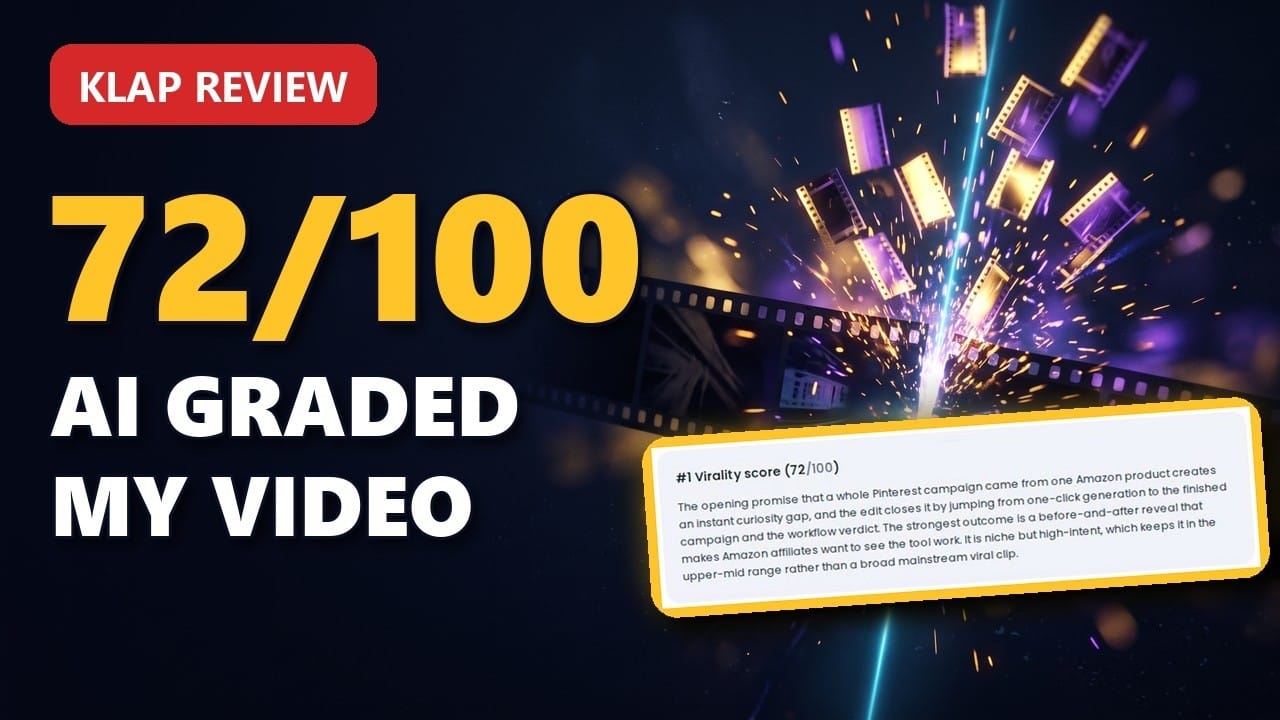
72 out of 100. That is the score Klap gave the best 38 seconds of my own review video. Under the score sat a full paragraph explaining why it picked that moment, from the hook in the first line to the payoff at the end.
That paragraph is the reason this Klap review exists. Klap scores every clip and tells you what it saw in it.
Below you get my full test on a real 6:19 video, two screenshots from my account, Klap pricing, how it compares as an OpusClip alternative, and who should skip it.
Klap review in 30 seconds
- What it is: an AI clipping tool that turns one long video into vertical shorts with captions for TikTok, Reels and YouTube Shorts
- My test: 6:19 video in, 6 shorts out in about 6 minutes, each with a virality score and a written reason
- Best feature: the Moments prompt, where you tell the AI in plain words what to clip
- Best for: podcasts, interviews, tutorials, webinars and product reviews (anything with speech)
- Price: 1 video free (no credit card), then from $29/month or $14/month billed yearly
- My rating: 4.2 / 5
Watch My Klap Review (4:52)
Prefer to see it? Here is the whole test on screen: the Moments prompt, the ranked results, the editor and post scheduling.
What Is Klap AI?
Klap (klap.app) is a web app that reads a long video, finds the strongest moments and cuts them into 9:16 shorts with animated captions. It is made by ZIGG SAS, a French company.
You paste a link from YouTube, Vimeo or Google Drive, or you upload the file. Klap detects the language, works in 52 languages, and gives you a ranked list of shorts you can edit, download or schedule straight to your social accounts.
It works best with speech. Klap itself names podcasts, interviews, educational videos, product reviews and trainings. Videos with little talking give it less to work with.
How I Tested Klap
I used one of my own videos: a 6:19 review of Pin2Profit AI on YouTube. Talking head plus screen recording, which is the format most marketers and course creators publish.
I pasted the YouTube link, added one instruction in the Moments box and clicked Generate. Here is the dialog right before that click:
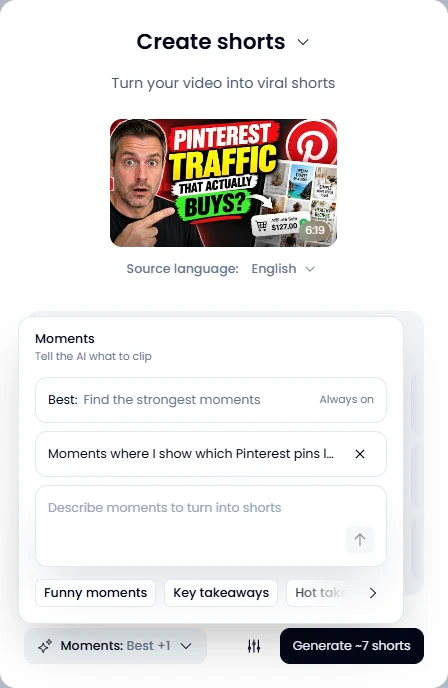
Klap estimated about 7 shorts. Processing took about 6 minutes for the 6:19 video, and Klap sent an email when the shorts were ready.
The result: 6 shorts, each with a title, captions, a virality score from 0 to 100, a written reason and the full transcript.
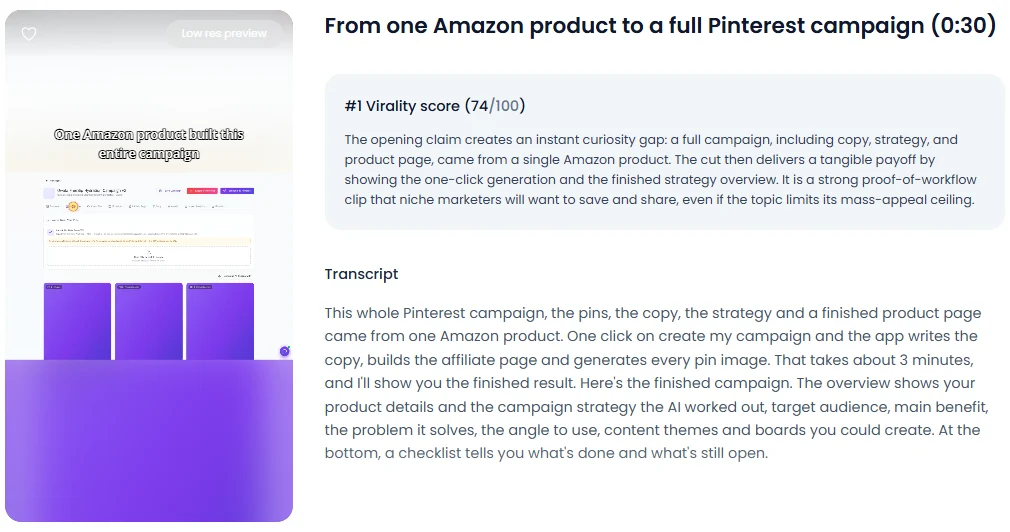
Look at the reason in that screenshot. It names the curiosity gap in the opening line, the payoff in the cut, and the limit: the topic caps the mass appeal. That last part is what makes the score useful. You see why a clip lands below the top spot.
One thing I noticed: scores move between runs. My first run gave the top short 74, the recorded run gave it 72. Use the score to sort your clips and the reason to decide.
How to Turn a Long Video Into Shorts With Klap
The whole flow takes six steps. Here is exactly what I clicked.
Step 1: Paste your link or upload the file. Drop a video into the field on the dashboard or paste a YouTube, Vimeo or Google Drive link. Click Generate.
Step 2: Check the settings. Klap opens the Create shorts window with the detected language. Pick a caption template, then open settings for shorts length, aspect ratio with smart reframe, captions and a TikTok-style intro title.
Step 3: Write a Moments prompt. “Best” always finds the strongest moments. Add your own instruction on top, in plain words. Chips like Key takeaways, Hot takes and Surprising facts give you quick starters.
Example prompt I used (copy/paste and adapt):
“Moments where I show which Pinterest pins lead to real sales.”
Step 4: Generate and wait. My 6:19 video took about 6 minutes. Klap emails you when it is done, so you can close the tab.
Step 5: Pick from the ranking. Read the reasons first. Post the clips whose reason matches your goal, and skip the ones Klap itself flags as weaker.
Step 6: Edit, then download or schedule. Trim, fix captions, add your logo, then download the MP4 or put it on the posting calendar.
Klap Features That Matter
The Moments Prompt
This is my favorite feature. You tell the AI what a good clip means for your video. A tutorial creator asks for the actionable steps. A podcaster asks for the guest’s strongest opinions.
Shorts made from your prompt are marked “Generated by you” and show the prompt they came from. You always know where a clip came from.
Virality Score With a Written Reason
Every short gets a score from 0 to 100 and a paragraph on why it was picked. The reasons also say what holds a clip back. That turns reviewing 6 clips from a rewatch job into a 2-minute read.
Suggestion Board
Want more from the same video? Create shorts inside a project opens a board with more moments Klap found, each with its own score. The timeline view shows where each moment sits in the full video. New suggestions arrive in about 2 minutes, and one new short takes about a minute.
Transcript-Based Editor
You trim a clip by deleting words from the transcript. Reframe sets the focus on the speaker or on everyone and lets the AI use layouts like split screen or screencast. Captions get presets, styles, emojis and translation.
Elements, B-Roll and Templates
Add an intro, an outro, your logo and a TikTok-style title. Klap can generate B-roll clips for you. Save your look as a template and the next video starts on-brand.
Posting Calendar
Schedule posts puts shorts on a calendar with time slots from morning to late night. Connect your accounts and Klap publishes for you. All plans include unlimited social accounts.
API, MCP Server and Automations
Klap has an API, an MCP server for AI assistants, and Zapier, Make and n8n integrations. If you run content as a pipeline, clipping can be one automated step.
Want the posting side for free? My guide to free YouTube Shorts upload automation pairs well with any clipper.
Klap Pricing (November 2026)
Klap charges by clips per month. All plans include AI clipping, unlimited social accounts and analytics.
| Plan | Clips per month | Monthly | Billed yearly (per month) |
|---|---|---|---|
| Basic | 100 | $29 | $14 |
| Pro | 300 | $79 | $39 |
| Pro+ | 1,000 | $189 | $94 |
Prices from klap.app/pricing. Check the page for the current numbers before you buy.
Quick rule: one minute of video gives about 5 clips, says Klap. Posting one short a day from 3 to 4 long videos a month fits Basic. Running several channels or clients points to Pro.
Yearly billing cuts the monthly price roughly in half. Test on monthly or on the free video first, then switch once you know your volume.
Klap vs OpusClip: Is Klap a Good OpusClip Alternative?
OpusClip is the clipper most people check first, and “OpusClip alternative” gets about 390 Google searches a month. Here is how the two line up, taken from both pricing pages on November 1, 2026.
I ran Klap on my own video. I did not run OpusClip on the same video, so this compares plans and features. Clip quality you judge with the free test on each.
| Klap | OpusClip | |
|---|---|---|
| Free option | 1 video free, no credit card | Free plan: 60 credits a month, watermark, no editing, clips exportable for 3 days |
| Entry plan | Basic: 100 clips, $29/month or $14/month billed yearly | Starter: 150 credits, $15/month (monthly only) |
| Mid plan | Pro: 300 clips, $79/month or $39/month billed yearly | Pro: 300 credits, $29/month or $14.50/month billed yearly |
| Billed by | Clips per month | Credits per month |
| Clip ranking | Virality score plus a written reason per short | Virality Score |
| Social accounts | Unlimited on every plan | 6 connections on Pro, scheduler from Pro |
| API and AI agents | API, MCP server, Zapier, Make, n8n | Limited API on Pro, full API on Business |
Quick rule: pick OpusClip if you want a free forever plan or the cheapest monthly start. Pick Klap if you want a written reason for every clip and unlimited social accounts on every plan.
What Other Klap Users Say
On Trustpilot, Klap has a TrustScore of 3.7 from 59 reviews (checked November 1, 2026). The ratings split into many five-star reviews and a solid block of one-star reviews.
The five-star reviews praise how easy and fast it is, the clipping and reframing, and quick help over live chat and Discord. Most one-star reviews are about billing: renewals people did not expect and trouble cancelling. Trustpilot shows that Klap replied to 100% of negative reviews.
My tip: before you choose a yearly plan, note your renewal date and find the cancel option in your account settings. Two minutes now saves a support ticket later.
Klap Pros and Cons
What I Like
- Every short comes ranked with a score and a written reason
- The Moments prompt lets you steer what gets clipped
- Transcript-based trimming is fast
- Editor, caption templates, B-roll and posting calendar in one app
- Unlimited social accounts on every plan
- API, MCP server and Zapier, Make and n8n for automation
- 52 languages
Good to Know
- Built for speech: videos with little talking give Klap less to work with
- The plan caps your clips per month
- One free video to test, then a paid plan
- Scores vary a little between runs
Who Should Use Klap?
Klap fits you if you:
- Publish podcasts, interviews, webinars, tutorials or product reviews
- Manage social accounts and want clips scheduled from the same tool
- Want to tell the AI in plain words what to clip
- Build content automations and want clipping as a step
Pick another tool if you:
- Mostly make music, gaming or fast-cut action videos
- Need frame-level editing (use a full video editor for that)
For the bigger picture of where a clipper fits in a social stack, see the best AI tools for social media managers in 2026, where Klap is entry #4.
My Klap Bonus: 9 Bonuses Worth $613
Klap makes the clips. My bonuses help you make them yours and turn views into buyers.
Start Klap through my link, pick any paid plan, and you get 9 bonuses in 3 packages, led by the Moments Prompt Library and the Hook & Script Engine (Klap edition). Pick Pro, Pro+ or any yearly plan and two upgrade kits are added: the Clip Agency Kit and the Winning Clip Ad Kit.
Klap FAQ
Is Klap free?
You can create one video for free. After that you need a paid plan, starting at $29 a month or $14 a month billed yearly.
How much does Klap cost?
Basic is $29 a month for 100 clips, Pro $79 for 300 clips and Pro+ $189 for 1,000 clips. Billed yearly, that drops to $14, $39 and $94 a month.
Is there a Klap promo code?
I don’t have a discount code. The biggest saving is yearly billing, which cuts the monthly price roughly in half. If you start through my link, you also get my 9 Klap bonuses.
Is Klap a good OpusClip alternative?
Yes, if your videos have speech and you want control over what gets clipped. Klap adds a written reason to every short and includes unlimited social accounts on every plan. OpusClip has a free forever plan and a cheaper $15 monthly start.
How accurate is the Klap virality score?
Treat it as a ranking aid. In my test the top short scored 74 on the first run and 72 on the second, and the order stayed useful. The written reason is the part that helps you decide.
What videos work best with Klap?
Videos with speech: podcasts, interviews, tutorials, product reviews, webinars and trainings. Klap works in 52 languages.
Can Klap post directly to TikTok and YouTube Shorts?
Yes. Connect your accounts and schedule shorts on Klap’s posting calendar. In my account it offered TikTok, YouTube, Instagram, Facebook and LinkedIn.
Final Verdict: Klap Review 4.2 / 5
Klap turned my 6:19 video into 6 ready shorts in about 6 minutes. The Moments prompt let me steer what it clipped, and the written reasons told me which short to post first.
That makes Klap one of the best AI clipping tools for anyone who talks on camera. Keep it to speech-heavy videos and pick the plan by how many clips you post.
Test it on one of your own videos. It costs nothing, and in 6 minutes you know if the picks match your style.
Try Klap on Your Own Video (Free)
Want more practical AI workflows like this? Join my WhatsApp group here.