A whiteboard explainer lives or dies on its script. The drawings and the voice only carry what the script gives them. A good one answers one question, one step per scene, and ends with a clear next step. A weak one tries to cover everything, and the hand ends up drawing a wall of text.
Below is the script template I use, the word counts that fit each video length, how to write headings that look good on the board, and a real example from the explainer I made for my Skribbly review. At the end there’s a prompt you can copy to draft scripts with ChatGPT or Claude.
Key Takeaways
- One video answers one question. Pick the question first, then write the scenes.
- Use 6 scenes for a 1.5 to 2 minute video: a title scene, four teaching scenes and a call to action.
- Every scene has two parts: a short heading for the board (2 to 5 words) and the narration (about 35 to 50 words).
- Plan with about 150 spoken words per minute: roughly 220 to 300 words for 6 scenes, 360 to 420 for 9, and 450 to 520 for 12.
- The last scene always tells the viewer exactly where to go next.
The Whiteboard Explainer Script Template (6 Scenes)
This structure works for “what is X”, “how does X work” and most product explainers:
- Title scene: the promise. Name the topic and why it matters to the viewer. One or two sentences.
- The basics. The simplest definition or the starting point. If someone stopped watching here, they’d still have learned something.
- How it works. The parts or players involved and how they connect.
- The key mechanism. The one detail that makes it click: the link, the formula, the setting, the trick.
- What to watch out for. The checkpoints, the common mistake, or the step people skip.
- The first move + call to action. What to do next, and where to go for it.
Need a longer video? Don’t add more topics. Split the teaching scenes into smaller steps, or add an example scene. Nine or twelve scenes work best when each one still teaches a single point.
How to Write Each Scene
The heading: what the hand draws
- 2 to 5 words. The board has room for a headline, not a sentence.
- Make it a label the viewer can remember: “Your Unique Tracking Link”, not “How Merchants Track Affiliate Sales Using Links”.
- Each heading should make sense on its own. At the end of a whiteboard video the camera often pulls back to show every heading at once, so the headings together should read like a summary of the whole video.
The narration: what the voice says
- About 35 to 50 words per scene. That’s 15 to 20 seconds, enough time for the hand to draw the heading and the picture.
- Short sentences, spoken language. Read it out loud once. If you stumble, the AI voice will too.
- Start each scene by linking it to the last one (“Once a merchant accepts you…”, “So a reader clicks and buys…”). That’s what makes the video feel like one story instead of six slides.
- Numbers and examples beat adjectives. “Four players have to be in place” is clearer than “there are several important parties”.
Word Count by Video Length
Most AI voices land near 150 words per minute at normal speed. Use these targets and check the timing in a preview before you render:
- 6 scenes: 220 to 300 words, about 1.5 to 2 minutes.
- 9 scenes: 360 to 420 words, about 2.5 minutes.
- 12 scenes: 450 to 520 words, about 3 minutes.
Voices differ, and so does the speed setting. If the video runs long, cut words from the narration, not scenes.
A Real Example: “What Is Affiliate Marketing?”
Here’s the structure of the six-scene explainer Skribbly wrote for my test, with the narration shortened to its core:
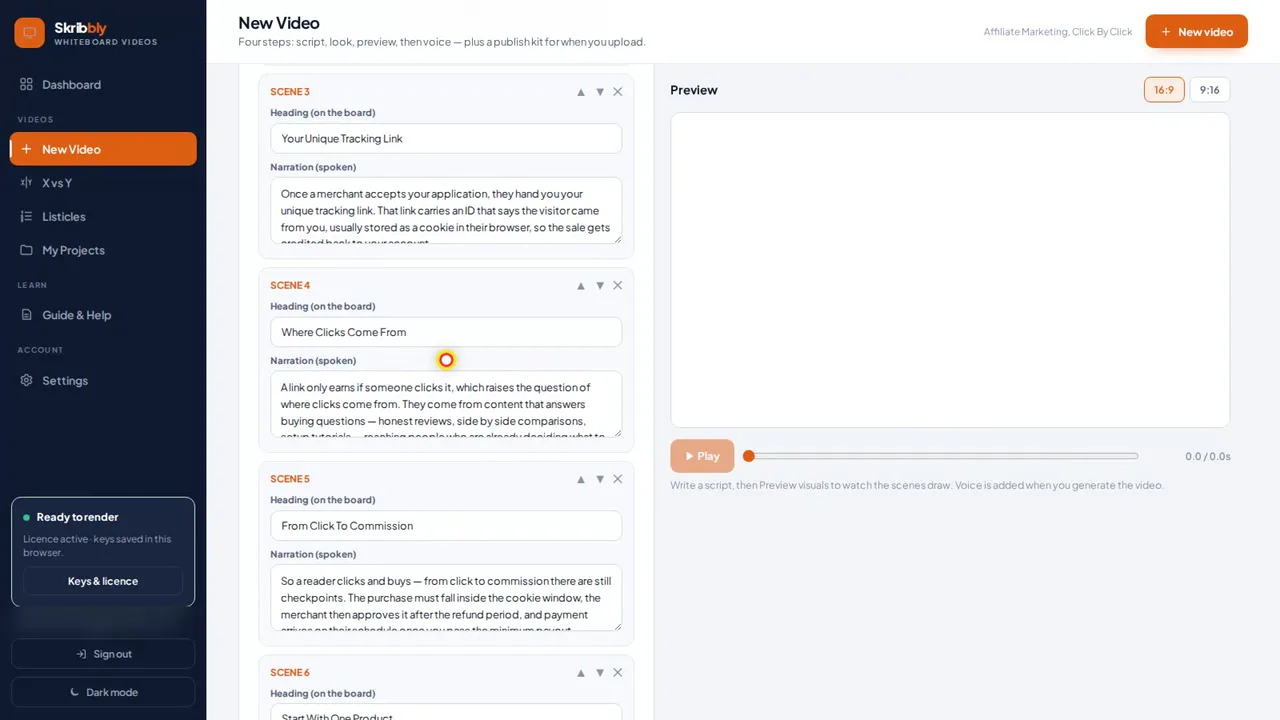
- Affiliate Marketing, Click By Click (title): “A lot of people want to earn online, so let’s walk through affiliate marketing, click by click.” Then the one-line definition: earning a commission when someone buys through your unique tracking link.
- Scene 2, the four players: the merchant, the affiliate program or network that tracks sales, you the affiliate, and the customer.
- Your Unique Tracking Link: the link carries an ID, usually stored as a cookie, so the sale is credited to you.
- Where Clicks Come From: content that answers buying questions: honest reviews, comparisons, setup tutorials.
- From Click To Commission: the checkpoints: cookie window, approval after the refund period, minimum payout.
- Start With One Product: pick one product you use, explain who it suits and who it doesn’t, disclose your links. Then the end screen with the link to my bonus page.
Notice the pattern: every scene answers the question the previous one raises. “Where do the clicks come from?” leads straight into scene four. That’s the thread that keeps people watching. You can watch the finished video at 5:26 in my review:
Copy-Paste Prompt: Draft Your Script With AI
Use this in ChatGPT or Claude, then edit the result before you render:
Write a whiteboard explainer video script about “[TOPIC]” for [AUDIENCE]. Use exactly [6] scenes. Scene 1 is a title scene with the promise of the video. Scenes 2 to [5] each teach one point and start by linking to the previous scene. The last scene gives one practical first step and ends with this call to action: “[CTA TEXT] [LINK]”. For every scene give: a HEADING of 2 to 5 words for the board, and NARRATION of 35 to 50 words in short, spoken sentences. Total narration: [220 to 300] words. No hype words, no rhetorical questions, only facts I can verify: [PASTE YOUR NOTES OR FACTS].
Using Skribbly? It writes the script for you from a topic, and its own-script mode keeps your words exactly if you write them yourself. It also has a button that copies a ready prompt in its own format.
5 Script Mistakes That Make Whiteboard Videos Drag
- Two topics in one video. Split them into two videos.
- Sentences as headings. The board turns into a page of text.
- A slow intro. Say what the video teaches in the first sentence.
- No transitions. Each scene feels like a new start and viewers drop off.
- A vague ending. “Check it out” isn’t a call to action. Say what to do and where.
Turn the Script Into a Video
Once the script is ready, an AI whiteboard video maker does the rest: it draws each heading and picture, adds the voice and captions, and puts your call to action on the end screen. I walk through the whole process, including costs, in my Skribbly review.
Try Skribbly → | See my Skribbly bonuses →
Frequently Asked Questions
How long should a whiteboard explainer script be?
For a 1.5 to 2 minute video, about 220 to 300 words across 6 scenes. Plan with roughly 150 spoken words per minute and confirm the timing in a preview.
How many words per scene?
About 35 to 50 words of narration and a heading of 2 to 5 words. That gives the hand enough time to draw without the scene dragging.
Can AI write a whiteboard video script?
Yes. ChatGPT or Claude can draft one with the prompt above, and tools like Skribbly write the script directly from a topic. Always check the facts and read it out loud once before you render.
What’s the best structure for an explainer video?
Promise, basics, how it works, the key detail, what to watch out for, and the first step with a call to action. One question, one point per scene.
Disclosure: this post contains affiliate links. If you buy through them I may earn a commission at no extra cost to you.