Whiteboard animation software has split into two camps. The classic tools give you a canvas, an image library and a timeline: you build every scene and they animate the drawing. The new AI tools take a topic or a script and generate the whole video. Which one is “best” depends on how much of the work you want to do yourself.
I compared seven tools on how they actually make a whiteboard video, what they cost, and who they fit. Pricing is taken from each vendor’s own website on October 1, 2026. Prices change often, so check the current page before you buy.
Quick Picks
- Best AI whiteboard video maker (done for you): Skribbly, $17 one-time plus your own AI usage.
- Best for full manual control: VideoScribe, from $150 a year.
- Best desktop app with a character library: Doodly, part of the Voomly Cloud suite.
- Best free plan to start: Powtoon (720p, watermark, up to 3 minutes).
- Best AI generator for longer videos: Golpo AI, credit-based.
- Best budget all-round editor: FlexClip.
- Best if you already live in Canva: Canva with the SpeedPaint app.
Manual vs AI Whiteboard Animation Software
Manual editors (VideoScribe, Doodly, Powtoon) give you the most control. You write the script, pick images from a library, place them on the canvas, time the drawing hand and add the voice. Great results are possible, but a two-minute video usually takes hours.
AI generators (Skribbly, Golpo AI, FlexClip’s AI mode) start from a prompt or a script. They plan the scenes, create the visuals and add the voice for you. Your job is checking and adjusting. If you need explainers regularly, this is where the time savings are.
1. Skribbly: Best AI Whiteboard Video Maker
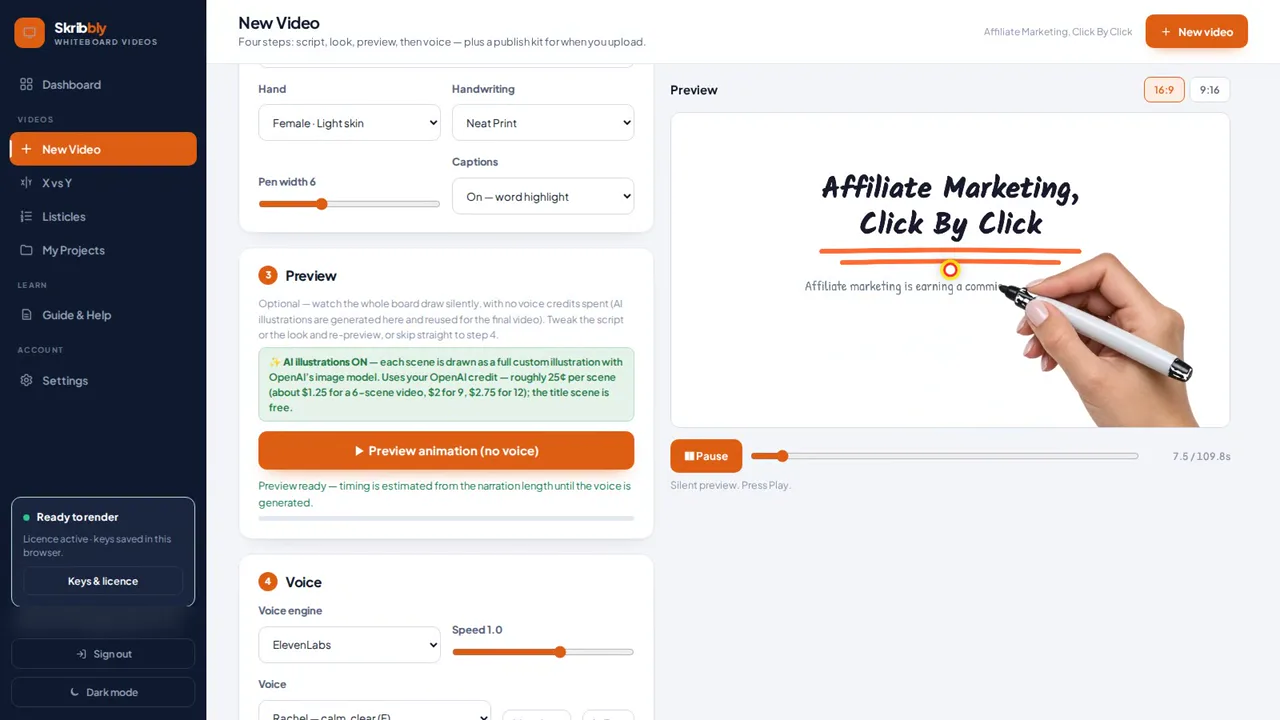
How it works: you type a topic or paste your own script. Skribbly writes the script in 6, 9 or 12 scenes, creates an illustration for each, and a real photographed hand draws the headings and pictures on one connected mind-map board. The camera follows the arrows from point to point and zooms out at the end to show the whole topic. Then it adds the voice (ElevenLabs, Fish Audio or your own recording), word-highlight captions and an end screen with your call to action and link.
Output: 1080p MP4 plus an .srt caption file, 32 languages, videos up to about three minutes.
Pricing: $17 one-time with a 30-day money-back guarantee. It’s bring-your-own-key (Anthropic, OpenAI and a voice provider); the vendor puts the cost at roughly $1 to $3 in credits per video. Optional upgrades add vertical 9:16 Reels, comparison and listicle formats and more; a $97 bundle unlocks everything.
Good to know: runs in desktop Chrome and records in real time, and you set up three AI keys once.
Best for: YouTubers, affiliate marketers, course creators and freelancers who want finished hand-drawn explainers without building scenes. Full walkthrough in my Skribbly review:
Check out Skribbly → | See my Skribbly bonuses →
2. VideoScribe: Best for Full Manual Control
How it works: the classic whiteboard editor from Sparkol. You build scenes on a canvas with a timeline and camera, using a large library of hand-drawn images and hundreds of templates, with drawing hands animating each element. The homepage also lists AI script generation and AI voiceovers.
Pricing (annual): Lite $150/year, Core $255/year, Max $320/year. Lite allows 5 downloads a month up to 5 minutes, Core 30 downloads up to 10 minutes, Max unlimited downloads up to 20 minutes. All plans export Full HD 1080p. There’s a 7-day free trial (watermarked). Subscription only.
Best for: people who want to design every scene themselves and need a big image library.
3. Doodly: Best Desktop App With a Character Library
How it works: a drag-and-drop desktop editor (Windows and Mac, internet connection required) with a library of custom-drawn characters and props. “Smart Draw” turns your own images into draw-on animations, and you can choose whiteboard, blackboard, glassboard or green screen boards.
Pricing: Doodly is now sold as part of Voomly Cloud, which bundles it with Toonly, Talkia and other tools: Standard $49/month or $490/year, Enterprise $79/month or $790/year. 14-day free trial and a 30-day money-back guarantee. Exports MP4 up to 1080p.
Best for: marketers who like a desktop workflow and want ready-made characters for story-style videos.
4. Powtoon: Best Free Plan to Start
How it works: a browser-based animation editor with a whiteboard style. You work from templates and a library of hand-drawn-style graphics, and the drawing effect is applied automatically. AI can draft whiteboard scripts, and you can record, upload or generate the voiceover.
Pricing: a free plan (720p, up to 3 minutes, watermark); Lite $15/month billed yearly (1080p, 5 exports a month, up to 10 minutes); Professional $40/month billed yearly or $70 billed monthly; Advanced $125/month billed yearly.
Best for: trying whiteboard animation for free, and teams that also make other animated video styles.
5. Golpo AI: Best AI Generator for Longer Videos
How it works: generates a whiteboard video from a prompt, a document or PDF, a script or audio, in styles like sharpie sketch, chalk and technical diagram. Higher plans add frame-by-frame editing with plain-language commands.
Pricing: credit-based, where 1 credit is 1 minute of video. Starter $39.99/month (20 credits, black and white, 30 seconds to 2 minutes); higher plans add colour, more languages and longer videos (up to 10 minutes on Business). Pay-as-you-go credits start at $7.99 each. The free tier gives one watermarked 1-minute video.
Best for: teams turning documents into longer whiteboard explainers on a monthly budget.
6. FlexClip: Best Budget All-Round Editor
How it works: a browser video editor with whiteboard templates and an AI text-to-video mode that builds a whiteboard-style video with synced audio from a prompt. It’s a general editor, so you can also cut, caption and brand other videos in the same place.
Pricing (from the vendor’s pricing guide): a free plan (720p, watermark, limited AI credits); Plus $11.99/month billed annually (1080p, no watermark, 300 AI credits a month); Business $19.99/month billed annually. 7-day money-back guarantee.
Best for: creators on a budget who want one editor for whiteboard clips and everything else.
7. Canva (SpeedPaint): Best If You Already Use Canva
How it works: Canva’s whiteboard animation feature uses the SpeedPaint app: upload an image or a design page and it turns it into a speed-draw animation. You then add text, transitions, music and AI voiceover in Canva’s video editor.
Pricing: you get one free SpeedPaint credit; more credits are purchased separately.
Best for: adding a quick drawing effect to designs you already have in Canva, rather than full explainer videos.
How to Choose
- You want finished explainers from a topic, cheaply: Skribbly. One-time price, a few dollars of AI credits per video.
- You want to design every scene by hand: VideoScribe or Doodly.
- You want to test the style for free first: Powtoon’s free plan.
- You need longer AI videos from documents: Golpo AI.
- You want one cheap editor for everything: FlexClip.
Whatever you pick, the script decides how good the video is. Here’s my whiteboard explainer video script template with a real example.
Frequently Asked Questions
What is the best whiteboard animation software?
For done-for-you explainers, an AI tool like Skribbly, which writes, draws, voices and captions the video from a topic. For full manual control, VideoScribe is the classic choice.
Is there free whiteboard animation software?
Powtoon and FlexClip have free plans with a watermark and 720p exports, and VideoScribe and Doodly offer free trials. Golpo AI gives one free watermarked minute.
Can AI make whiteboard animations?
Yes. Skribbly, Golpo AI and FlexClip’s AI mode generate whiteboard videos from a prompt or script. Skribbly also writes the script and draws it with a photographed hand on one connected board.
Is there whiteboard animation software without a subscription?
Skribbly is a one-time $17 purchase; you pay your own AI providers per use. The other tools in this list are subscription or credit based.
Disclosure: this post contains affiliate links for Skribbly. If you buy through them I may earn a commission at no extra cost to you. Pricing for every tool was taken from the vendors’ own websites on October 1, 2026 and may have changed since.