Whiteboard explainer videos still do one job better than almost any other format: they teach. A hand draws one idea at a time, the voice explains it, and the viewer follows along. The catch has always been the production. Script it, sketch every scene, animate the drawing, record and sync the voice, add captions. That’s why a short whiteboard video is listed on Fiverr at $135 to $285 (the range Skribbly’s own sales page quotes).
Skribbly is a new AI whiteboard video maker by Stephanie Hayes that does the production part for you, in your browser. I ran it end to end for this review: one topic in, a finished 1080p video with voice, captions and my own link on the end screen out. Below is the full walkthrough, what each video really costs, and who it’s a good fit for.
Check out Skribbly here → | See my Skribbly bonuses →
Key Takeaways
- Skribbly turns a topic (or your own script) into a finished whiteboard explainer: AI script, a real photographed hand drawing headings and illustrations, voiceover, word-highlight captions and a call-to-action end screen.
- All scenes sit on one connected mind-map board. The camera follows the arrows from point to point and pulls back at the end to show the whole topic.
- It runs in desktop Chrome with your own AI keys (Anthropic, OpenAI, ElevenLabs or Fish Audio). The vendor puts the cost at roughly $1 to $3 in credits per video.
- The front end is $17 one-time with a 30-day money-back guarantee. No monthly fee.
- You get a 1080p MP4 plus an .srt caption file, in 32 languages, with 6, 9 or 12 scenes (up to about three minutes).
What Is a Whiteboard Explainer Video?
A whiteboard explainer is a short video where a hand draws simple headings, icons and diagrams while a voice explains the topic. It works because the drawing sets the pace: the viewer sees each idea appear at the moment it’s spoken, so a complex topic gets broken into small, easy steps.
That makes the format a natural fit for “what is X” and “how does X work” videos, product explainers, course lessons and affiliate content that answers buying questions. It’s also one of the most popular faceless video styles on YouTube, because nobody has to be on camera.
Whiteboard Animation Software vs an AI Whiteboard Video Maker
Classic whiteboard animation software gives you a canvas, an image library and a timeline. You still write the script, pick or draw every image, place it, time the hand and sync the voice. The result can look great, but a two-minute video is an afternoon of work.
An AI whiteboard video maker like Skribbly flips that. You give it the topic, and it writes the script, plans the scenes, creates the illustrations, draws them with the hand, adds the voice and the captions. Your job moves from building scenes to checking and adjusting them.
How to Make a Whiteboard Video With AI (Step by Step in Skribbly)
A new video in Skribbly is one page, top to bottom, in four steps. Here’s exactly what I did for my test video on the topic “What is affiliate marketing?”
Step 1: The script
Type your topic. Specific beats broad: a question people actually type into YouTube keeps the script focused, and every scene answers one part of it. Then the settings:
- Format: 16:9 for YouTube. Vertical 9:16 for Shorts and Reels comes with the Skribbly Reels upgrade.
- Scenes: 6, 9 or 12. Six gives you about a minute and a half to two minutes, twelve about three. For a first video, six is the right call.
- Language: 32 of them. The script, the text on the board and the captions all switch together.
- Audience, tone and AI model: a few words like “beginners who want to earn online” and “friendly and practical” are enough.
- Call to action: the text and the link the hand writes on the end screen. I pointed mine at my bonus page. Always fill this in.
Already have a script? Switch to “Use my own script” and Skribbly keeps your words exactly, planning the headings and pictures around them. There’s also a mode that builds the whole video around your own voiceover recording.
The AI script comes back in about a minute as scene cards. Each card has a heading (what the hand writes) and the narration (what the voice says). You can edit both, move scenes or delete one. Narration edits are free; changing a heading redraws that scene’s picture.
Step 2: The look
Pick the board (whiteboard, blackboard, notebook paper, glassboard, cream card or your own colours), the hand (marker, pen or chalk, each in five skin tones), one of ten handwriting fonts and the pen width. I kept the whiteboard with the marker hand and switched on captions: every word lights up as it’s spoken, which keeps people watching with the sound off.
Tip: pick one combination that fits your brand and stick with it, so every video on your channel looks like it belongs together.
Step 3: The silent preview
Now Skribbly creates the illustrations and plays the whole video without a voice. This is where it stands out from other tools: it isn’t a slideshow of separate scenes. The hand writes a heading, draws the picture, and the camera follows an arrow to the next point on the same board. At the end it pulls back and the whole topic appears as one mind map, followed by the end screen with your link.
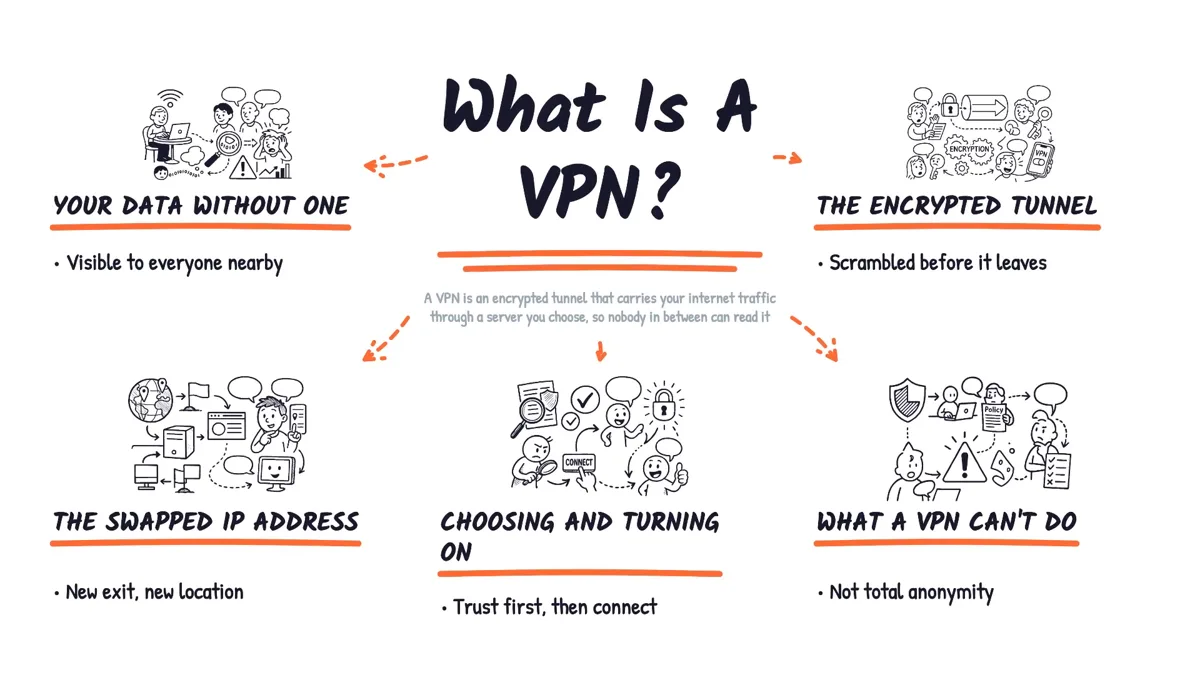
Because the preview has no voice yet, you can check every scene before you spend anything on audio.
Step 4: Voice and generate
Choose one of twelve built-in ElevenLabs voices, your own cloned voice from your ElevenLabs account, Fish Audio, or your own recording. Set the speed (0.7 to 1.2), add quiet background music if you like, and generate. The final video records in real time, so a two-minute video takes about two minutes and the tab needs to stay in front while it runs.
My six-scene test came out at just under two minutes. You download the MP4 and an .srt caption file you can upload to YouTube with it. Projects stay in “My Projects” for seven days in that browser, so download what you want to keep. You can watch the finished result at 5:26 in the video above.
What an AI Whiteboard Video Really Costs
Skribbly is bring-your-own-key, so you pay the AI providers directly and there’s no Skribbly subscription on top. The vendor’s own figures:
- Script (Anthropic Claude): under 10 cents.
- Illustrations (OpenAI): about $1.25 for 6 scenes, $2.00 for 9 and $2.75 for 12.
- Voice: billed per character by ElevenLabs or Fish Audio, or free if you upload your own recording.
- Overall: roughly $1 to $3 in credits per video. Re-rendering with another voice or look reuses the pictures you already paid for.
Compared with $135 to $285 for a commissioned short whiteboard video, that’s the main reason this tool is interesting for anyone who needs explainers on a regular basis.
Upgrades and the Bundle
The $17 front end makes complete landscape videos. The upgrades are optional:
- Publish Kit ($9.95 order bump): one click writes a YouTube title, a description with chapters, a summary, an FAQ and schema markup from your video.
- Theme & Font Pack ($12.95), Skribbly Reels for 9:16 video ($17), X vs Y comparison videos ($24.95), Listicles ($24.95) and the Retention Scripter ($17).
- The $97 bundle unlocks everything at once.
If you plan to post Shorts and Reels as well as long-form videos, the bundle is the simpler choice.
Good to Know Before You Buy
- You set up three AI keys once. Anthropic, OpenAI and a voice provider. It takes a few minutes, and it’s what keeps the price at $17 once instead of a subscription. Set a spending limit with each provider.
- It runs in desktop Chrome and records in real time. Start the render and let it finish with the tab in front.
- Per scene you edit the heading and the narration. The drawings follow from those, so you guide the pictures through the heading text.
Who Skribbly Is For
Skribbly fits anyone who makes explainer videos regularly and wants them hand-drawn without drawing anything: YouTubers running faceless or educational channels, affiliate marketers making “what is X” and product explainer videos, course creators, and freelancers selling whiteboard videos to clients. The licence covers client work on two devices, so you can sell the videos you make (not the tool itself).
Want short clips from content you already have? This guide shows how to turn any article into short AI videos with a Claude skill.
My Skribbly Bonuses
If you pick up Skribbly through my link, you get my bonus stack on top, built for the parts around the video. The three I’d use first:
- Topic Scout (Chrome extension): open any product page, article or YouTube video and get the autocomplete keywords people actually search for, ten video topics and a fact sheet to paste straight into Skribbly.
- Video-to-Post Repurposer: takes the .srt file Skribbly exports and turns it into a blog article, an email and posts for YouTube, X, LinkedIn and Facebook.
- Whiteboard Visual Studio: thumbnails and article images in the same hand-drawn look as your video.
Upgrade and bundle buyers get extra bonuses on top. See the full bonus stack and how to claim it →
Verdict
Skribbly goes a step further than template-based whiteboard tools. It doesn’t just animate scenes you built yourself: it writes the script, draws it on one connected board with a photographed hand, voices it and captions it, and the zoom-out mind map at the end looks like something you’d normally pay a freelancer for. With your own AI keys, each video costs a dollar or three, and the front end is a one-time $17 with a 30-day guarantee.
Rating: 4.6 / 5: a finished hand-drawn explainer from one topic, for the cost of a coffee per video.
Get Skribbly here → | Claim my Skribbly bonuses →
Frequently Asked Questions
What is the best AI whiteboard video maker?
It depends on how much you want to build yourself. If you want to arrange every scene on a timeline, classic whiteboard animation software works. If you want a finished whiteboard explainer from a topic or script, with the script, drawings, voice and captions done for you, Skribbly is the one I’d pick.
How do I make a whiteboard video with AI?
In Skribbly: type a topic (or paste your script), choose 6, 9 or 12 scenes and a language, pick the board, hand and font, check the silent preview, then choose a voice and generate. You get a 1080p MP4 and an .srt caption file.
How much does Skribbly cost?
$17 one-time for the front end, with a 30-day money-back guarantee. You also pay your own AI usage, which the vendor puts at roughly $1 to $3 per video. Optional upgrades are offered after checkout, and a $97 bundle unlocks everything.
Can I use my own script or my own voice?
Yes. “Use my own script” keeps your words exactly as written, and you can upload your own voiceover recording and let Skribbly build the video around it.
Does Skribbly work in other languages?
Yes, 32 languages for the script, the board text and the captions. For natural narration, pick a native ElevenLabs or Fish Audio voice or record your own.
Can I sell whiteboard videos made with Skribbly to clients?
Yes. The licence is personal, includes client work and runs on two devices. You sell the videos you make, not access to the tool.
Disclosure: this review contains affiliate links. If you buy through them I may earn a commission at no extra cost to you, which also pays for the bonuses mentioned above. Product facts and cost figures are taken from the vendor’s own sales page and from my own test.