There are more Pinterest marketing tools than ever in 2026, and most of them now say “AI” somewhere on the box. Some design pins, some schedule them, some find keywords, and a few try to do everything from one keyword or one product link.
This guide sorts the best Pinterest marketing tools by the job they do, with current prices and plan limits checked on each vendor’s own pricing page in October 2026. Two of them are mine or ones I promote, and I say so where it applies.
Quick Picks
| Tool | Best for | Starting price |
|---|---|---|
| Pinterest’s own tools | Scheduling, bulk upload and trends at no cost | Free |
| PinDominator (my tool) | Keyword-first AI pins with SEO copy, any niche | $1 for 7 days, then $37/year |
| Pin2Profit AI | Amazon affiliates: one product link to a full campaign | $27 one-time |
| Tailwind | Pinterest-first scheduling, SmartPin and keyword tool | Free to start; from $17.99/month billed annually |
| Canva | Designing pins from templates | Free; Pro $144/year |
| Buffer | Cheap multi-channel scheduling | Free; Essentials $5/channel/month billed yearly |
| Later | Visual planning across channels | From $18.75/month billed yearly |
| Metricool | Free plan that includes Pinterest | Free; Starter from $20/month billed annually |
| ChatGPT | Writing titles, descriptions and keyword ideas | Free plan available |
| Zernio | Developers and AI agents posting through an API | Free for 1–2 accounts |
How to Think About Pinterest Tools
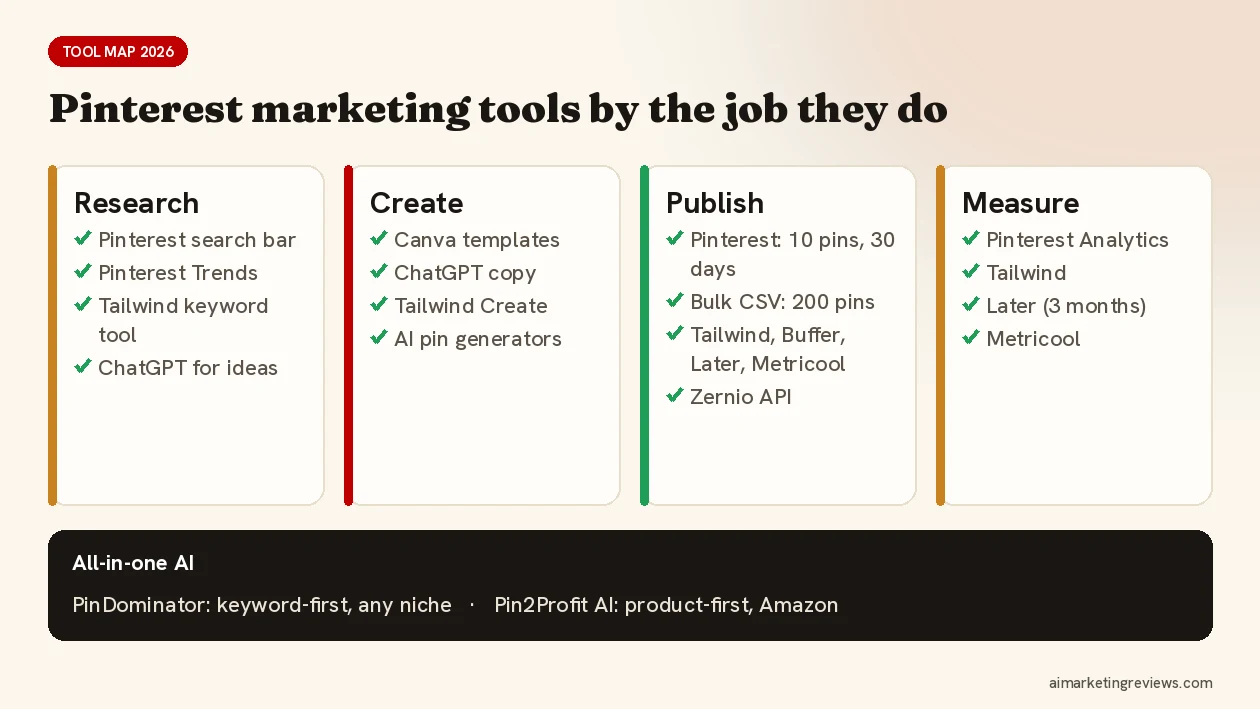
Every Pinterest workflow has the same four jobs: research (what do people search?), create (pins, copy, video), publish (schedule at a steady pace) and measure (what got clicks?). Most tools cover one or two of these. The newer AI tools try to cover research to publish in one go. Pick by the job that eats most of your time.
One rule applies to every tool: Pinterest’s guidelines limit repetitive affiliate pins and unofficial automation. Stick to tools that publish through Pinterest’s official API, a bulk CSV upload or Pinterest’s own scheduler.
1. Pinterest’s Own Free Tools
Best for: anyone starting out.
- Scheduler: queue up to 10 pins, each up to 30 days ahead, on a business account.
- Bulk upload: create up to 200 image or video pins from one CSV file.
- RSS auto-publish: turn a feed into up to 200 pins a day (desktop).
- Pinterest Trends: search trends for up to the last two years, by region, with predictions.
- Pinterest Predicts 2026: 21 trends for the year.
What’s missing: AI pin creation for organic pins. Pinterest’s generative AI features (like generated product backgrounds in Performance+) are for ads. Pinterest has also announced a Business Assistant (closed beta, US) and a Pinterest MCP for AI agents (alpha partners), so expect more here.
2. PinDominator: Best All-Round AI Pin Generator (My Own Tool)
Best for: bloggers, faceless creators and affiliates promoting content, lead magnets or digital offers.
Full disclosure: I built PinDominator. It’s keyword-first. You enter one keyword and it creates image and video pins with SEO titles and descriptions, so the research and copy are done together with the design.
- Bulk Pin Machine, SEO Copy Engine, Campaign Builder and Pin Analytics.
- Export as a CSV for Pinterest’s bulk upload, or schedule through Zernio or Buffer.
- Bring your own AI key with zero markup on AI costs.
- Starter $37/year (3 connected accounts), Pro $67/year (10 accounts and brand kit). $1 for a 7-day trial, 14-day money-back guarantee.
3. Pin2Profit AI: Best for Amazon Affiliates
Best for: affiliates who promote Amazon products on Pinterest.
Pin2Profit AI is product-first. You paste one Amazon product link and it builds a full Pinterest campaign: product angles, pins in several styles, video pins, keywords and an affiliate page you host yourself, so your pins link to your page instead of a raw Amazon link. It connects through an officially approved Pinterest app and runs on your own AI keys with no credits or markup (text can run on Google’s free tier; images and video cost a few cents per item with the provider).
It launched on WarriorPlus on October 16, 2026 at $27 one-time with a 30-day money-back guarantee. My full review and bonus: Pin2Profit AI for Amazon affiliates (review and bonus).
4. Tailwind: Best Pinterest-First Scheduler
Best for: people who mostly market on Pinterest and want scheduling, SEO and AI in one place.
Tailwind is an official Pinterest partner and one of the API-connected scheduling partners Pinterest itself names.
- Create designs several pins at once; SmartPin turns a URL into a fresh AI-written pin every week; Ghostwriter drafts titles, descriptions and alt text.
- SmartSchedule, pin spacing, a browser extension and a Pinterest keyword tool.
- Pin Scheduling & Creation plan: $17.99/month billed annually or $29.99 billed monthly, per Pinterest account, with 300 credits a month (one credit per scheduled pin). Separate Pinterest SEO and Engagement plans start at $11.99/month billed annually. You can start free with no credit card.
- Tailwind also has an app inside ChatGPT for creating and planning pins.
Good to know: everything runs on credits, so heavy posting means a bigger plan or extra credits ($10 per 100).
5. Canva: Best for Designing Pins
Best for: custom pin designs from templates.
- Pinterest pin templates at 1000 × 1500.
- AI tools like Magic Write, Magic Resize and Magic Edit. Free includes up to 20 AI uses; Pro up to 200.
- The Content Planner schedules designs straight to Pinterest on Pro and Business plans.
- Pro is $144/year. Canva is also a Pinterest partner.
6. Buffer: Best Budget Multi-Channel Scheduler
Best for: Pinterest plus other networks on a small budget.
- Free plan: 3 channels, 10 scheduled posts per channel.
- Essentials: $5 per channel per month, billed yearly; 14-day trial on paid plans.
- Pinterest publishing and analytics; up to 25 posts per 24 hours.
Good to know: no Pinterest topic tags and a 500-character description limit.
7. Later: Best for Visual Planning
Best for: brands that plan Pinterest alongside Instagram and TikTok in one calendar.
- Starter: $18.75/month billed yearly, 30 posts per profile per month, 5 AI credits.
- 14-day free trial; Pinterest included in all plans.
- Pinterest analytics go back up to 3 months.
8. Metricool: Best Free Plan With Pinterest
Best for: testing scheduled pinning at no cost.
- Free: 1 brand, 1 Pinterest connection, 20 posts a month, 30 days of analytics.
- Starter: from $20/month billed annually ($25 monthly), with unlimited publishing under fair use.
- Schedule pins and analyze boards. Pinterest lists it as a partner.
9. ChatGPT: Best Free Writing Assistant
Best for: keyword ideas, titles, descriptions and board names.
ChatGPT doesn’t know Pinterest’s search data, but it’s fast at drafts you then check in the Pinterest search bar. Pinterest’s own creator blog recommends using AI for titles, keywords and alt text. Images from ChatGPT carry provenance metadata, so check how Pinterest labels AI content first. My prompt library: ChatGPT for Pinterest: 15 prompts for pin titles, descriptions and boards.
10. Zernio: Best for Builders and AI Agents
Best for: developers, automations and AI agents.
Zernio calls itself “marketing infrastructure for agents”: one API, MCP server and CLI that publishes to many networks, including Pinterest, through official APIs. It doesn’t create pins. It’s the publishing layer behind tools like PinDominator’s scheduling. One to two accounts are free, then from $6 per account per month.
Also Worth a Look
TrafficWave 3.0 takes a URL-driven approach with AI image and video pins. I covered it in detail in my TrafficWave 3.0 review.
Which Pinterest Tool Should You Choose?
- Just starting, no budget: Pinterest’s scheduler and bulk upload, Canva Free, ChatGPT and Metricool Free.
- Content, blogs or digital offers: PinDominator for keyword-first pins, plus Pinterest’s bulk upload or Zernio/Buffer to publish.
- Amazon affiliate: Pin2Profit AI for product-first campaigns and pages.
- Pinterest is your main channel: Tailwind.
- Many networks at once: Buffer, Later or Metricool.
The strategy matters more than the tool. If you’re promoting affiliate offers, start with this Pinterest affiliate marketing step-by-step guide. For how to judge AI pin generators in particular, read 7 things to check before you pick an AI Pinterest pin generator. More tools I’ve reviewed, each with a bonus, are on Ben’s Bonus Offers.
FAQ
What is the best tool for Pinterest marketing?
It depends on the job. Tailwind is the strongest Pinterest-first scheduler, Canva the most flexible designer, and AI generators like PinDominator (keyword-first) or Pin2Profit AI (Amazon products) cover research, design and copy together.
Is Tailwind worth it for Pinterest?
If Pinterest is your main channel, it’s a strong option: it’s an official Pinterest partner and combines scheduling, SmartPin, Ghostwriter and a keyword tool. Plans start at $17.99/month billed annually, and you can start free.
What’s the best free Pinterest scheduler?
Pinterest’s own scheduler (up to 10 pins, 30 days ahead) and bulk upload (200 pins per CSV). Metricool’s free plan and Buffer’s free plan also include Pinterest with monthly limits.
Are AI Pinterest tools allowed?
Yes. Pinterest allows AI-generated content and may label it “AI modified”. What it doesn’t allow is spammy automation and repetitive affiliate pins, so use tools that publish through official channels.
Disclosure: PinDominator is my own product. Some other links in this post are affiliate links, and I may earn a commission if you buy through them at no extra cost to you. Prices and plan limits are from each vendor’s pricing page as of October 12, 2026 and can change; check before you buy.


