“Pinterest affiliate marketing without a blog” is one of the most searched versions of this topic, and it’s easy to see why. Nobody wants to build and maintain a full blog just to send some pins to Amazon.
The good news: you don’t need a blog in the traditional sense. The catch: for Amazon specifically, you do need a website you own. Here’s why, and how AI page builders turn that requirement into a small, fast job instead of a months-long project.
Key Takeaways
- Pinterest allows direct affiliate links, so “without a blog” is technically possible for many programs.
- Amazon Associates is different: Pinterest isn’t one of its accepted social networks, so you need a website you own as your listed Site.
- A lightweight “affiliate page” per product or roundup is enough. It’s not a blog, but it does the jobs Amazon and the FTC care about.
- AI tools can now build those pages from a product link, along with the pins that point to them.
Can You Do Pinterest Affiliate Marketing Without a Website?
For many affiliate programs, yes. Pinterest’s own guidelines say affiliate links are allowed, as long as your pins are original, you’re transparent about the link and you use affiliate links in moderation.
For Amazon Associates, there’s a hurdle. When you apply, you list the Sites where your links will appear. Amazon’s accepted social networks are Facebook, Instagram, X, YouTube, TikTok and Twitch, usually with 500+ followers. Pinterest isn’t one of them. Websites have to be your own. So for Amazon, “without a website” isn’t a safe plan.
Why a Simple Affiliate Page Beats a Direct Link Anyway
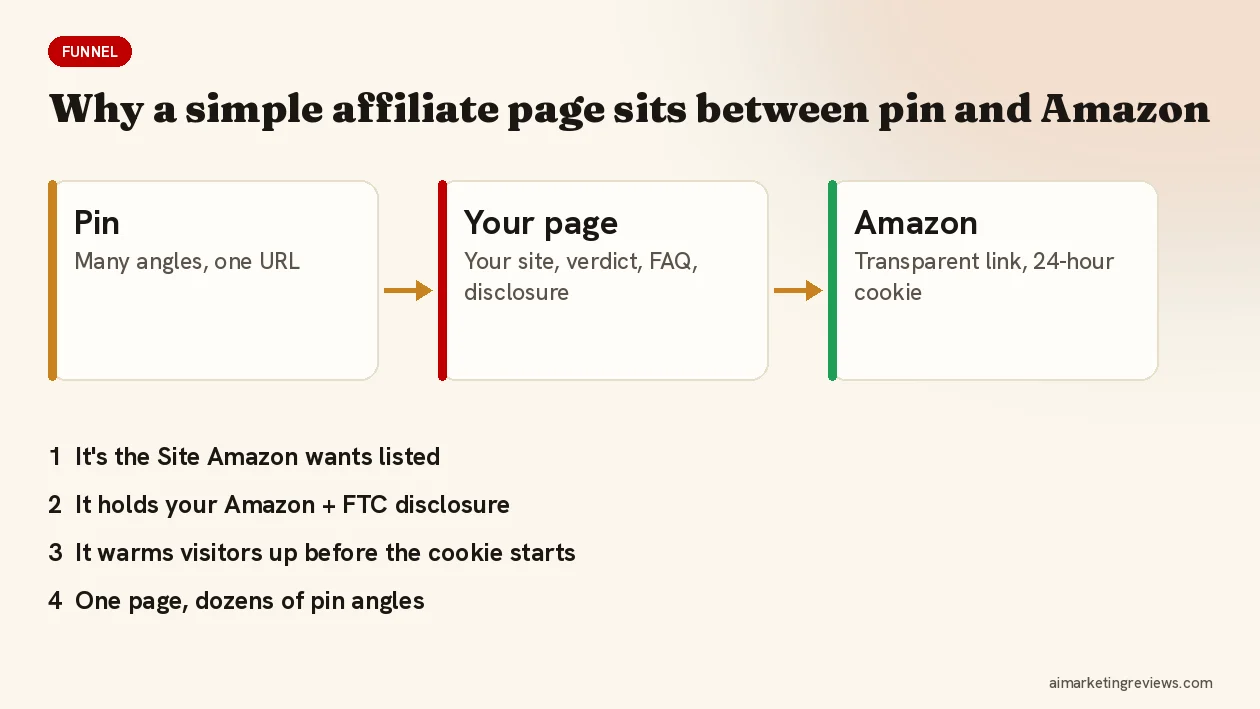
Even where direct links are allowed, a short page between the pin and the product does four jobs a pin can’t:
- It’s your Site. The page lives on a domain you own, which is what Amazon wants listed.
- It holds your disclosure. Amazon requires “As an Amazon Associate I earn from qualifying purchases” clearly and prominently, and the FTC wants disclosures close to the recommendation.
- It sells. A quick verdict, pros and cons, FAQs and alternatives warm up the visitor before Amazon’s 24-hour cookie starts counting.
- It multiplies pins. A “10 gifts for coffee lovers” page gives you ten products and dozens of pin angles, all pointing to one URL.
What an Affiliate Page Needs (and What It Doesn’t)
Needs:
- A clear headline that matches the pin.
- Your honest take: who it’s for, what it’s good at, what to know.
- Images, key features, a short FAQ.
- A transparent Amazon link (no cloaking; Amazon forbids shorteners that hide the destination).
- The Amazon disclosure and your own affiliate disclosure.
Doesn’t need: a content calendar, 50 blog posts, a newsletter, a fancy theme. One good page per product or roundup is a complete unit.
How AI Builds the Page and the Pins Together
Until recently you’d build the page in a site builder, then design pins in Canva, then write descriptions, then plan keywords. AI tools now do those steps from a single input.
Pin2Profit AI is a good example of the product-first approach. You paste an Amazon product link and it builds an affiliate page around the product, alongside pins in seven styles, video pins, copy, keywords and a posting schedule. The vendor’s own example sites (a popcorn maker site and a family game night site) show the format: hero, quick verdict, features, recipes or buying guides, and the Amazon button. You can see more in my Pin2Profit AI review: Amazon affiliate pages and Pinterest pins from one link. It launched on October 16, 2026 at $27 one-time.
Whatever tool you use, do two things yourself: put the page on a domain you own, and read it before it goes live. AI writes fast; it doesn’t know which claims you’re comfortable putting your name to.
A Minimal Setup for Beginners
- Register a domain for your niche and point it at a simple host or site builder.
- List that domain as your Site in Amazon Associates.
- Create one page per product or roundup with the disclosure at the top.
- Make several different pins per page and publish a few a day, not all at once.
- After a few weeks, check Pinterest outbound clicks and Amazon reports, and build more of what works.
Comparing tools for the pin side? My guide to AI Pinterest pin generators lists what to check. Want more tools that shortcut the setup? I keep my current picks and bonuses on Ben’s Bonus Offers.
FAQ
Can I use my Pinterest profile as my Amazon Associates website?
Pinterest isn’t on Amazon’s list of accepted social networks for Associates, so the safe option is to list a website you own.
Do I need a blog for Pinterest affiliate marketing?
Not a blog in the classic sense. Pinterest allows direct affiliate links for many programs. For Amazon, though, you need a website you own, and a few simple product pages are enough.
What should an Amazon affiliate page include?
A headline matching the pin, your honest take, images and key features, a short FAQ, a transparent Amazon link, the Amazon Associates statement and your own disclosure.
Disclosure: Some links in this post are affiliate links, and I may earn a commission if you buy through them at no extra cost to you. Amazon and Pinterest rules quoted are from their official pages as of October 2026. This is general information, not legal advice.