ChatGPT is very good at the words around a pin: keyword ideas, titles, descriptions, board names and alt text. It’s much less good at knowing what people actually search on Pinterest. Used the right way, it turns an hour of Pinterest copywriting into ten minutes.
Below are 15 copy-and-paste ChatGPT prompts for Pinterest, grouped by job, plus a context block that makes every prompt work better, and a checklist for the step people skip: checking the output.
What ChatGPT Can and Can’t Do for Pinterest in 2026
- It can write: keyword variations, pin titles, descriptions, board names and descriptions, alt text and video pin scripts. Pinterest’s own creator blog recommends using AI for titles, keywords and alt text.
- It can make images: ChatGPT Images 2.5 (released September 2026) is available on every plan, with stricter limits on the free plan.
- It can’t see Pinterest search data. It guesses what people search. You confirm it in Pinterest.
- It doesn’t post to Pinterest by itself. I couldn’t find an official Pinterest app in ChatGPT’s app directory as of October 2026. Tailwind offers a third-party ChatGPT app for creating and planning pins.
- Its images carry provenance data. OpenAI adds C2PA metadata and an invisible SynthID watermark. Pinterest labels AI content using image metadata, its own classifiers and creator disclosure. Whether a given image gets the “AI modified” label isn’t something anyone can promise, so don’t rely on it either way.
Start With a Context Block
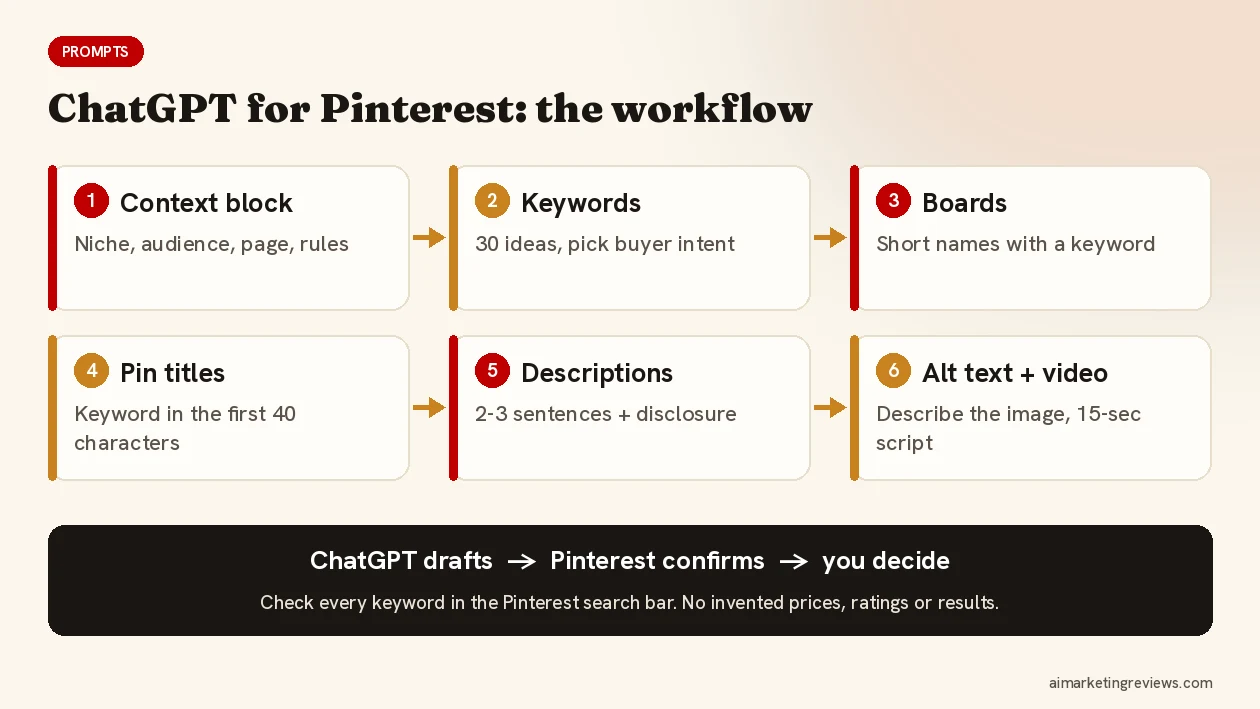
Generic prompts give generic pins. Paste this once at the start of a chat, fill in the brackets, and every prompt below gets better:
You are my Pinterest marketing assistant.
Niche: [e.g. small kitchen organization]
Audience: [e.g. renters in small apartments, mostly women 25-44]
What I promote: [e.g. a roundup page of storage products / my blog post / a digital planner]
Page URL and what's on it: [paste the headline and 3-5 key points]
Tone: helpful, specific, no hype, no fake claims.
Rules: Pinterest titles max 100 characters with the keyword in the first 40.
Descriptions 2-3 natural sentences, max 500 characters. No hashtags.
Never invent prices, ratings, reviews or results.
Keyword Prompts
1. Seed keyword list
List 30 phrases people would type into Pinterest search when looking for [topic]. Mix: beginner, "best", comparison, gift, seasonal and problem phrases. One per line, lowercase, no numbering.
2. Buyer-intent filter
From this list, pick the 10 phrases closest to a purchase decision and explain in 5 words each why. [paste list]
3. Long-tail expansion
For the keyword "[keyword]", give 15 longer variations that add a room, a person, a budget, a problem or a season. Keep each under 6 words.
Then check: type each phrase into the Pinterest search bar. Keep the ones Pinterest suggests or shows plenty of results for. Use Pinterest Trends to see whether a phrase is growing or seasonal.
Board Prompts
4. Board names
Suggest 8 Pinterest board names for my niche. Each must be short (under 30 characters), contain a searchable keyword and cover one clear subtopic. No cute names.
5. Board descriptions
Write a 2-sentence Pinterest board description for the board "[board name]". Include the board keyword and 2 related phrases naturally.
6. Board plan
Map these 20 keywords to the boards below. Each keyword goes to exactly one board. Flag keywords that don't fit any board. [paste keywords + boards]
Pin Title Prompts
7. Title variations
Write 10 Pinterest pin titles for the keyword "[keyword]" pointing to my page. Put the keyword in the first 40 characters. Use these angles: list, how-to, problem/solution, comparison, gift. Max 100 characters each.
8. Angle per audience
Rewrite this pin title for 4 different readers: beginner, busy parent, budget shopper, gift buyer. Keep the keyword first. Title: "[title]"
9. Text overlay
Turn each of these titles into a pin image text overlay of max 6 words that's readable on a phone. [paste titles]
Description Prompts
10. SEO description
Write a Pinterest description for the pin "[title]". 2-3 natural sentences: what the pin shows and who it's for, what they get on the page, then "Contains affiliate links." Use "[keyword]" once and these related phrases once each: [phrases]. Max 500 characters.
11. Five unique descriptions
I'm making 5 different pins for the same page. Write 5 descriptions that each lead with a different benefit, so no two pins read the same.
12. Fact check my description
Check this description against my page content. List any claim that isn't supported by the page, any number I can't prove, and anything that sounds like hype. [paste description + page points]
Images, Alt Text and Video Prompts
13. Alt text
Write alt text (max 300 characters) describing this pin image for someone using a screen reader. Describe what's actually visible. Mention "[keyword]" only if it describes the image. [describe or upload the image]
14. Pin image brief
Create a vertical 2:3 Pinterest pin image for "[title]": [scene], bright natural light, clean layout with space at the top for a 6-word headline. No logos, no brand names, no fake product labels.
15. 15-second video pin script
Write a 15-second vertical video pin script for "[title]": a 2-second hook, 3 quick scenes with on-screen text (max 5 words each) and an ending line that sends viewers to the page. No voice-over needed.
Check Before You Publish
- Search check: is the keyword something Pinterest suggests?
- Length check: title up to 100 characters, keyword in the first 40; description up to 800 on Pinterest, 500 in bulk upload and many schedulers.
- Truth check: no invented prices, ratings, reviews, results or badges.
- Disclosure: a short affiliate note in the description and a full disclosure on the page.
- Variety: Pinterest limits repetitive affiliate pins, so each pin should have its own angle, image and words.
- AI label: if you use AI images, Pinterest lets you mark a pin as AI-modified yourself when you create it.
The SEO rules behind these checks (fields, board naming, freshness) are explained in Pinterest SEO for affiliates. For a look at how Pinterest’s AI label works, read Pinterest’s “AI modified” label explained.
When a Dedicated Tool Beats Copy and Paste
ChatGPT prompts are perfect for a few pins a week. Once you need fresh pins every day across several boards, copying between ChatGPT, a design app and Pinterest becomes the bottleneck. That’s the job of an AI pin generator:
- Keyword-first: my own PinDominator does this whole workflow end to end. One keyword in; image and video pins with SEO titles and descriptions out, ready to export as a CSV or schedule.
- Product-first: for Amazon products, Pin2Profit AI builds the angles, pins, video pins, keywords and a product page from one link. See an AI tool that writes Amazon product pins from one link.
- Scheduling from ChatGPT: Tailwind’s ChatGPT app can turn a webpage into pin drafts and schedule them from inside ChatGPT.
A side-by-side comparison is in the best Pinterest marketing tools in 2026, and more AI tools I’ve reviewed are on Ben’s Bonus Offers.
FAQ
Can ChatGPT create Pinterest pins?
It can write the copy and generate an image, but it doesn’t publish to Pinterest on its own. You download the image, add it in Pinterest (or a scheduler) and paste the title and description.
Is ChatGPT content allowed on Pinterest?
Yes. Pinterest allows AI-generated content and recommends AI for titles, keywords and alt text. It may label AI images “AI modified”, and you can mark them yourself. The usual rules still apply: original, useful, not repetitive.
Can ChatGPT do Pinterest keyword research?
It can brainstorm keyword ideas, which Pinterest itself suggests doing. It can’t see Pinterest search volume, so confirm every keyword in the Pinterest search bar or Pinterest Trends.
Do I need ChatGPT Plus for Pinterest?
No. The prompts above work on the free plan. Paid plans give higher limits, including for image generation.
Disclosure: PinDominator is my own product. Some other links in this post are affiliate links, and I may earn a commission if you buy through them at no extra cost to you. ChatGPT and Pinterest facts are from OpenAI’s and Pinterest’s official pages as of October 2026.