If you’ve seen a small “AI modified” tag on a pin lately, you’ve met Pinterest’s answer to the flood of AI images. For marketers who use AI to make pins, that raises fair questions. Will labeled pins get less reach? Can users hide them? Should you stop using AI altogether?
Here’s what Pinterest has actually announced, what it means for your pins, and how to keep AI-made content working for you.
Key Takeaways
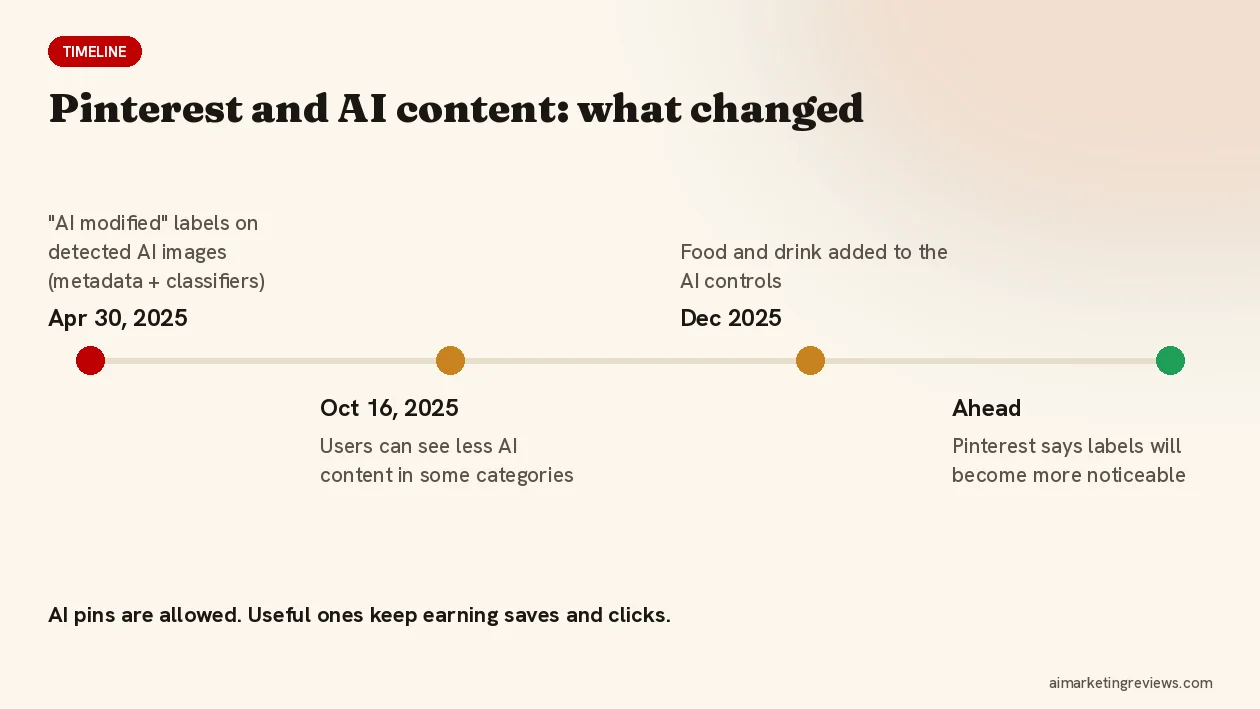
- Since April 30, 2025, Pinterest shows an “AI modified” label on images it detects as AI-generated or AI-edited.
- Detection uses image metadata (IPTC) plus Pinterest’s own classifiers. You can also self-declare, and there’s an appeal route if a label is wrong.
- Since October 16, 2025, users can choose to see less AI content in some categories (food and drink was added in December 2025).
- AI pins aren’t banned. The pins that keep working are the useful ones: real comparisons, clear how-tos, honest gift lists.
What the “AI Modified” Label Is
Pinterest introduced Gen AI labels on April 30, 2025. When you open a pin, an “AI modified” label can appear in the bottom-left corner of the close-up view. Pinterest detects AI content in two ways: metadata embedded in the file (the IPTC standard many AI tools write) and classifiers that look at the image itself. If you tell Pinterest a pin is AI-generated, it gets the label too. If the label is wrong, you can appeal.
Pinterest has also said the labels “will become more noticeable” over time, so expect them to be easier to spot, not harder.
Can Users Turn Off AI Pins?
Partly. On October 16, 2025 Pinterest added Gen AI controls: in Settings, under “refine your recommendations”, users can choose to see less AI content in certain categories. In December 2025 food and drink was added to that list. It’s “less”, not “none”, and it’s category by category. But it does mean some people actively filter AI-looking content, especially in visual-heavy niches.
What This Means If You Use AI for Pins
1. Usefulness beats volume
Pinterest already prohibits repetitive, high-volume affiliate pins. Labels add a second filter: a user who sees “AI modified” on a pin that adds nothing has a reason to scroll on. A pin that answers a question (“how to store a popcorn maker in a tiny cabinet”) still gets the save.
2. Lean on real product information
The strongest AI pins are built from real details: the actual product, its real features, a true comparison. That’s why product-first tools that analyze the product before designing pins are a better fit than generic image generators.
3. Mix formats
Combine AI images with real product photos, screenshots and short video pins (Pinterest recommends 15 to 60 seconds for organic video). Variety helps both the algorithm and the human.
4. Keep your text human
Titles, descriptions and the page your pin links to are what convert. Read every AI-written line before it goes live, check that claims match the product, and add a clear disclosure if the link earns you a commission.
5. Don’t try to hide it
Stripping metadata to dodge labels is a bad trade. Classifiers still look at the image, and getting caught looks worse than the label. Pinterest’s own approach is transparency; match it.
Tools That Fit the New Reality
The AI pin tools worth paying for in 2026 do more than generate images. They plan angles, write keyword-rich copy, make video pins, and space pins out over time instead of flooding your account. Pin2Profit AI, for example, analyzes an Amazon product first, then builds pins in seven different styles, video pins, copy and a schedule of 3 to 5 pins a day with at least two hours between them. It’s also an officially approved Pinterest app. I cover it in my Pin2Profit AI review for Amazon affiliates on Pinterest; it launched on October 16, 2026.
For a broader look at what to check before buying a pin generator, read my guide to choosing an AI Pinterest pin generator, and see the other tools I’m reviewing on Ben’s Bonus Offers.
FAQ
What does “AI modified” mean on Pinterest?
It’s a label Pinterest adds to pins whose images it detects as AI-generated or AI-edited, based on file metadata and its own classifiers, or because the creator said so.
How do I turn off AI pins on Pinterest?
You can’t turn them off completely, but you can see less of them: go to Settings, then “refine your recommendations”, and use the Gen AI controls for the categories offered.
Do AI-generated pins get less reach?
Pinterest hasn’t said labeled pins are down-ranked. But users can choose to see less AI content in some categories, so pins need to be genuinely useful to hold attention.
Can I remove the AI label from my pin?
If the label is wrong, Pinterest offers an appeal. If the image is AI-generated, the label is accurate, and trying to hide it isn’t worth the risk.
Disclosure: Some links in this post are affiliate links, and I may earn a commission if you buy through them at no extra cost to you. Pinterest details are from Pinterest’s newsroom and help center as of October 2026.